How to set up an AI agent for customer support that actually resolves questions
A step-by-step guide to an AI agent on your website chat: what to train it on, how to set a confidence threshold, when to hand off, and how to measure it.

On this page
- What an AI support agent is (and what it isn’t)
- Before you start: decide what the agent is for
- Step 1: Give it a small, accurate knowledge base
- Step 2: Write its instructions like a job description
- Step 3: Set a confidence threshold, and start strict
- Step 4: Design the handoff as carefully as the answers
- Step 5: Test it against real questions before customers see it
- Step 6: Launch in stages, and say it’s an AI
- Step 7: Measure resolution, not deflection
- What to look for in an AI support agent
- Mistakes we see most often
- Your launch checklist
Key takeaways
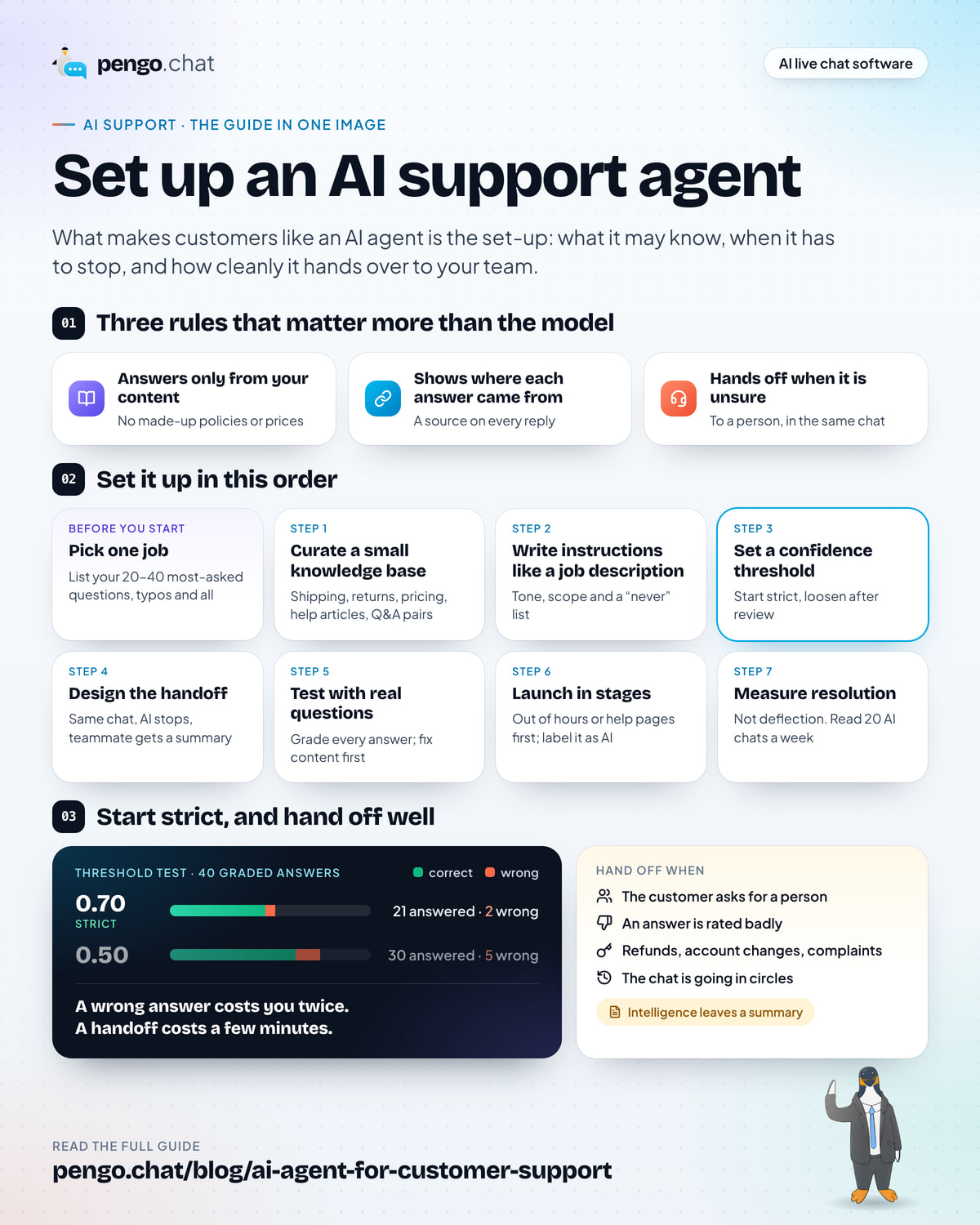
- A good AI support agent answers only from content you give it, shows where each answer came from, and hands off when it is unsure. Those three rules matter more than which model it runs on.
- Start with a small, accurate knowledge base: shipping, returns, pricing and your most-asked how-to questions. Leave out anything outdated or opinionated.
- Set a confidence threshold and start strict. A wrong answer costs you more than a handoff does, so lower it only after reviewing real conversations.
- Design the handoff as carefully as the answers. The customer should never repeat themselves, and your teammate should get a written summary.
- Measure resolution (answered without a person, and the customer didn't come back about it), not deflection.
Most people have met a support chatbot that made things worse. It didn’t understand the question, offered three buttons that didn’t fit, and then made it hard to reach a person. So it’s reasonable to be wary of putting one on your own site.
The good news is that the difference between that experience and an AI agent customers actually like isn’t the model. It’s the set-up: what the agent is allowed to know, when it has to stop, and how cleanly it hands over to your team. Those are decisions you make, and this guide walks through each one in the order we’d make them.
What an AI support agent is (and what it isn’t)
It helps to separate three things that all get called “chatbots”:
| Compared on | Decision-tree bot | AI support agent | AI copilot |
|---|---|---|---|
| What it does | Offers buttons and fixed replies | Answers customers directly in plain language | Drafts replies for your team to send |
| Where answers come from | Flows someone built by hand | Your help content, found at the moment it’s asked | Your help content plus the conversation |
| How it fails | Question doesn’t match a button | Answers when it should have handed off | A teammate sends a weak draft |
| Best for | Routing (“Sales or support?”) | Repetitive questions, out-of-hours cover | Speeding up human replies |
This guide is about the middle column. Most teams end up using a copilot too, but the agent is where the set-up decisions really matter, because nobody reviews its answers before the customer reads them.
Before you start: decide what the agent is for
An AI agent can do several jobs: answer common questions, capture leads when you’re offline, qualify visitors before sales calls, or triage chats for your team. Trying to do all of them on day one is the most common way to end up with an agent that does none of them well.
Pick one primary job. For most small teams, it’s answering the repetitive questions: the ones your team types the same reply to every day.
Then build your test set. Open your inbox or your email and write down the 20 to 40 questions customers ask most, in their words, typos and all. For an outdoor clothing store like Kettlewell Outdoor, that list starts something like:
- “how long does delivery to the US take?”
- “can I return boots if I’ve only worn them indoors”
- “do the trailhead boots come in a wide fit”
- “how do I pause my sock club”
- “is the daypack waterproof”
This list becomes three things: the content you need to have, the questions you’ll test before launch, and the baseline you’ll measure against afterwards. Keep it in a spreadsheet; you’ll come back to it.
Step 1: Give it a small, accurate knowledge base
Here is how a well-built AI agent answers a question, and why the content you give it is the whole game.
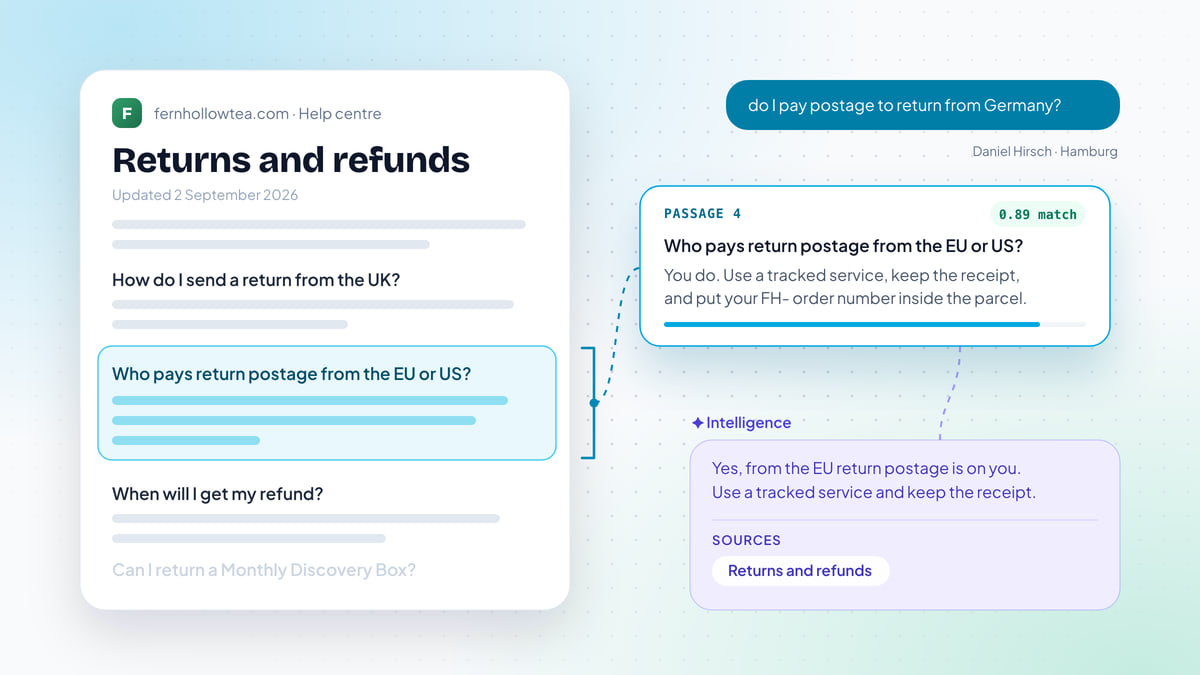
The agent doesn’t “know” your business. Each time a question arrives, it searches your content for passages that mean the same thing as the question (that’s what embeddings are for), puts the best ones in order (reranking), and writes an answer from them. If your returns page says 30 days and an old blog post says 14, the agent may find either one. It can only be as accurate as what it finds.
So the first job is curation, not volume.
Include:
- Shipping, delivery and returns pages
- Pricing and plan pages, including what each plan includes
- Your help centre or FAQ articles
- Setup and how-to guides for your product
- Short Q&A pairs for things that aren’t written down anywhere (“Do you ship to PO boxes?” “Yes, in the UK only.”)
Leave out, at least to start:
- Old blog posts and announcements, especially ones that mention prices or policies
- Marketing pages full of claims (“the fastest”, “loved by thousands”) that the agent will repeat as facts
- Legal pages, unless customers really do ask about them
- Anything you wouldn’t be happy to see quoted back to a customer word for word
When you find two pages that disagree, fix the content rather than hoping the agent picks the right one. If you’re writing or rewriting help articles for this, our guide to writing help content an AI agent can answer from covers structure, length and the small habits that make articles easy to retrieve.
Step 2: Write its instructions like a job description
Most AI agents let you add instructions on top of the knowledge base. This is where you set tone, scope and limits. Write them the way you’d brief a new teammate on their first day: short, specific, and with the things they must never do.
You answer customer questions for Kettlewell Outdoor, an outdoor clothing store in Leeds.

Tone: warm, plain and brief. Two or three sentences unless the customer asks for more.
Use British spelling. No exclamation marks in every line.

Answer only from the help content provided. If it doesn't cover the question,
say you're not sure and offer to pass the chat to the team.

Never:
- promise refunds, discounts or exceptions to policy
- change orders, addresses or subscriptions (hand these to the team)
- give safety advice about routes, weather or mountain conditions
- guess delivery dates beyond what the shipping page says

When you hand off, tell the customer a person will reply in this chat.
Three things make instructions work:
- Say what to do when the answer isn’t there. “Say you’re not sure and offer a person” is the single most valuable line you’ll write.
- List the things it must not promise. Refunds, discounts, exceptions, dates. An agent that’s trying to be helpful will otherwise offer them.
- Keep answers short. Customers in chat read two sentences, not five paragraphs. Offer more detail if they want it.
Step 3: Set a confidence threshold, and start strict
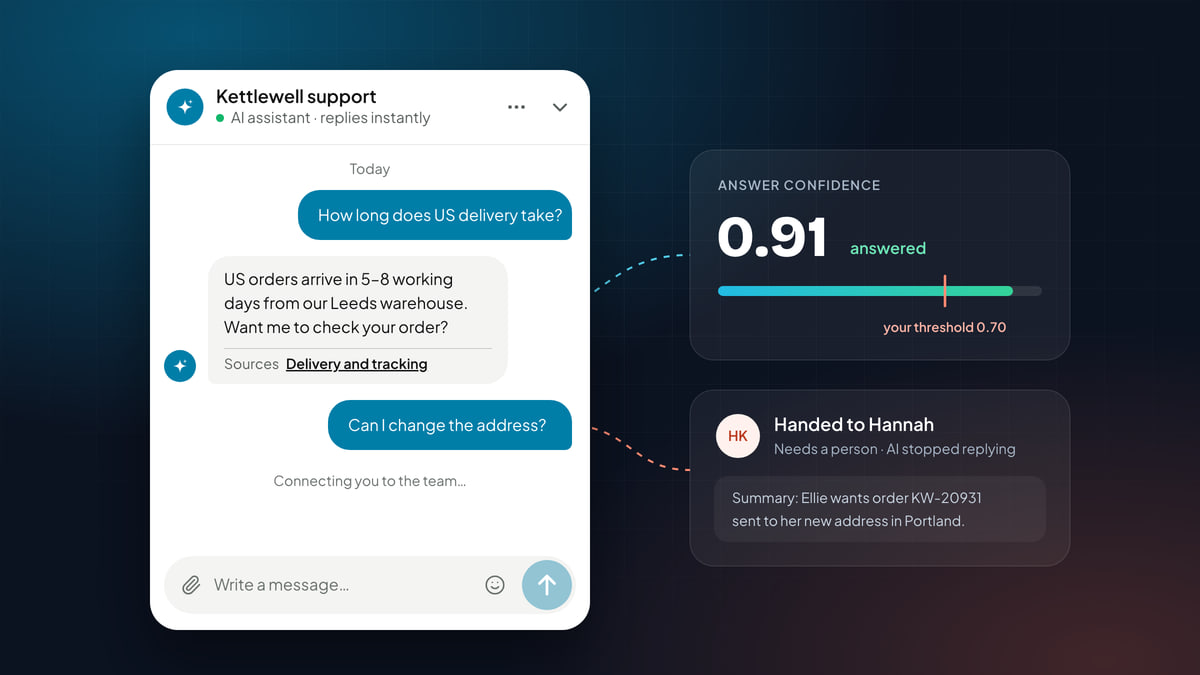
A grounded agent scores each answer for how well the content it found actually covers the question. You choose the line: above it, the agent replies; below it, the chat goes to a person.
Where you put that line is a trade-off, and it’s easier to see than to describe. The chart below shows 40 graded test answers from a set-up like the one above. Green answers were correct, red ones were wrong. Drag the threshold.
- Answered by AI
- 21 / 40
- Wrong answers sent
- 2
- Correct answers held back
- 9
A chart of 40 test answers plotted by confidence score. At a threshold of 0.70, the agent answers 21 questions with 2 wrong, and holds back 9 correct answers for a person. Lowering the threshold to 0.50 answers 30 with 5 wrong.
Notice two things. Correct answers cluster at high confidence, and wrong ones at low, but the groups overlap in the middle. And lowering the threshold doesn’t just add correct answers; it starts adding wrong ones at almost the same rate.
That’s why we recommend starting strict. A wrong answer costs you twice: the customer acts on it, and then someone has to clean up. A handoff costs a few minutes of a teammate’s time. Once you’ve reviewed a week or two of real conversations and fixed the content gaps they reveal, lower the threshold a step and watch what happens.
Step 4: Design the handoff as carefully as the answers
Confidence isn’t the only reason to hand off. Write down the rest before launch:
- The customer asks for a person. Any phrasing: “human”, “real person”, “agent”, “talk to someone”. Never make them ask twice.
- The customer rates an answer badly, or says it didn’t help.
- The topic needs a person: refunds, order or account changes, complaints, cancellations, anything legal or medical.
- The conversation is going in circles. The same question asked a third way is a signal, not a challenge.
Then make sure the handoff itself is good. A bad handoff (“Please email support@…”) throws away everything the customer has already said. A good one keeps the conversation in the same chat, tells the customer a person is coming, stops the AI from replying over the top of your teammate, and gives that teammate a summary so they can start with the answer instead of the questions.
Plan for the hours when nobody’s there. If a handoff happens at 2am, the agent should say when the team is back and ask for an email address so the reply doesn’t depend on the customer keeping the tab open.
Step 5: Test it against real questions before customers see it
Remember the 20 to 40 questions from your inbox? Now you run every one of them through the agent, in the customer’s own words, and grade each answer. Most tools have a test playground for exactly this.
| Grade | What it means | What to fix |
|---|---|---|
| Correct, right source | The answer is right and cites the page you’d expect | Nothing |
| Correct, odd source | Right answer, but from an unexpected page | Look for duplicated or conflicting content |
| Wrong | Incorrect, out of date, or invented | Fix or remove the content it used; consider a higher threshold |
| Should have handed off | Answered something a person should handle | Add a handoff rule or instruction |
| Handed off needlessly | The answer exists but the agent didn’t find it | Add or rewrite content; check the question wording |
Fix the content before you touch the instructions. Nine times out of ten, a bad answer is a missing, outdated or contradictory page, not a prompt problem. Run the full set again after each round of fixes. You’re ready when wrong answers are rare enough that you’d be comfortable with a customer seeing them, and every handoff is one a person genuinely should take.
Step 6: Launch in stages, and say it’s an AI
You don’t have to switch the agent on everywhere at once. Two gentle ways to start:
- Out of hours first. Let the agent cover evenings and weekends, when the alternative is no reply at all. Customers are most forgiving here, and you get real conversations to review.
- On your help pages first. Visitors reading a returns article are asking support questions, not buying questions. Add the pricing and checkout pages once you trust it.
Label the agent clearly. Give it a name if you like, but say it’s an AI assistant, and show the way to a person. In the EU, the AI Act requires telling people when they’re interacting with an AI system, and customers everywhere react better to an assistant that’s honest about what it is than one that pretends.
Step 7: Measure resolution, not deflection
“Deflection” counts every chat that didn’t reach a person as a win, including the ones where the customer gave up, emailed instead, or came back angrier the next day. It flatters the agent and hides the problems.
Measure these instead:
- Resolution rate: AI-handled conversations closed without a handoff, where the customer didn’t come back about the same thing within a few days, divided by all conversations the AI handled.
- Handoff rate and reasons: how often it hands off, and why. Low confidence points to content gaps; “asked for a person” early in chats can point to tone or labelling.
- Satisfaction on AI conversations compared with human ones. A big gap means something’s wrong with the answers or the handoff.
- Wrong answers found in review. Read 20 AI conversations a week. It takes 15 minutes and it’s the most useful quality check there is.
Then run a short weekly loop:
-
Read twenty AI conversations
Pick a mix: some resolved, some handed off, some rated badly. Note anything wrong, stale or awkward.
-
Fix the content, not the prompt
Update the article the agent used, add a Q&A pair for anything missing, and delete pages that contradict each other.
-
Look at what people asked that you couldn't answer
Questions that ended in a handoff for low confidence are your content to-do list, ranked by how often they come up.
-
Adjust one setting at a time
If wrong answers are rare and needless handoffs are common, lower the threshold a step. Then watch for a week.
What to look for in an AI support agent
Everything in this guide depends on the tool giving you the controls to do it. When you choose one, check for these:
| Capability | Why it matters |
|---|---|
| Answers only from your content | No made-up policies or prices. The agent can only be as right as your help pages, and never more creative. |
| A source on every answer | Customers trust an answer they can check, and your team can trace a wrong one to the page that caused it. |
| A confidence threshold you control | You decide how sure the agent must be before it replies, and tighten or loosen it as you learn. |
| Handoff in the same chat, with a summary | The customer never starts again, and your teammate picks up with the full story. |
| Many ways to learn | Website crawl, sitemaps, files, Q&A pairs. Real knowledge is spread across all of them. |
| A test playground | Grade answers before a single customer sees one. |
| A learning loop | Good conversations become suggested knowledge, and unanswered questions surface as a gap list. |
| One inbox for AI and people | Handed-off chats land where your team already works, not in a separate tool. |
| AI vs human reporting | You can see resolution, handoffs and satisfaction side by side, so you know it’s working. |
Pengo Intelligence was built around exactly this list: it answers only from your workspace’s content, cites every source, hands off below your threshold with a written summary, learns from six kinds of source, and reports AI and human conversations in the same analytics. See it on the Pengo Intelligence page.
Mistakes we see most often
- Training on everything. Pointing the agent at a whole website, blog and all, is the fastest way to get confident answers built on a 2021 announcement.
- Hiding the human. If the only way to reach a person is to fail three times, customers notice, and they remember.
- Letting it make promises. Refunds, discounts and dates belong in the “never” list from day one.
- Measuring deflection. It will tell you everything is fine right up until reviews say otherwise.
- Never reading the conversations. The agent won’t tell you it’s wrong. Fifteen minutes a week will.
Your launch checklist
AI agent launch checklist
0 of 12 done
An AI agent set up this way won’t answer everything, and it shouldn’t. What it will do is answer the questions it’s sure about, quickly and with a source, and get out of the way for the rest. That’s the version customers actually like using.