Human-in-the-loop AI support: approvals that are fast for customers and light for your team
Human-in-the-loop AI support works when the AI prepares everything, one person makes one decision, and the customer always knows where things stand. Here's how.

On this page
- What human-in-the-loop AI support means
- Why both extremes fail
- What a good approval request contains
- Who approves
- Where people approve
- Approve, edit, decline or take over
- What the customer sees, while waiting and after
- Reminders and expiry: nothing waits forever
- Team only: when a person should own it
- Use the activity log to decide what graduates
- What good tooling looks like
- Mistakes we see most often
- Your approval set-up checklist
Key takeaways
- Human-in-the-loop done well means the AI prepares everything, a person makes one decision, and the customer is kept informed the whole time.
- A good approval request carries the customer, the exact action, what it touches and the amount taken from the order, not the chat, so nobody has to open another tab to decide.
- Route by risk: any teammate for everyday changes, managers for high-risk ones, and a second person when a teammate goes above their own limit.
- Send requests to wherever people already are (phone, watch, email, Slack, inbox), let the first decision win, and make sure an unanswered request reminds, escalates and expires without ever approving itself.
- Use the activity log to graduate the boring actions to Auto with guardrails, and keep the judgement calls with a person.
Once an AI assistant can act in your tools (cancel an order, refund a payment, skip a subscription), the obvious question is who gets to say yes. Most teams’ first instinct is one of two extremes. Either the AI does everything on its own and you hope for the best, or every request goes to a person and the AI becomes a very polite receptionist.
Neither works for long. The good version sits in between, and it’s more specific than “a human checks it”. The AI prepares everything. A person makes one decision. The customer is told what’s happening the whole way through.
This guide covers how to build that: what an approval request should contain, who should approve what, where approvals should reach people, what the customer sees while they wait, and how to decide, with evidence, what can stop needing approval at all.
What human-in-the-loop AI support means
The key word is decision. A person in the loop shouldn’t be redoing the work. They shouldn’t be opening the store admin to find the order, checking whether it shipped, or working out the refund. If they are, the AI hasn’t really done its part.
Done well, a teammate’s whole involvement is a glance and a tap. Done badly, it’s the same ten-minute task as before, with an extra notification on top.
Why both extremes fail
Full autonomy
Letting the AI run every action on its own sounds efficient until you picture the bad day. A customer insists an order never arrived and asks for a refund. Another wants to cancel a subscription that, with a short conversation, they’d have paused. A third claims to be someone they’re not. An AI acting alone treats all three the same way as the easy cases.
The issue isn’t that the AI is careless. It’s that some decisions involve money that doesn’t come back, judgement about a relationship, or certainty about identity, and those deserve a person. Full autonomy also makes it hard to build trust gradually: you only find out what you’re comfortable with after something has already happened.
Everything to a person
The opposite extreme feels safe, and it quietly brings back the problem you were trying to fix. If every action needs a teammate, the AI’s main contribution is typing “I’ve passed this to the team”. Customers wait as long as they did before. Your team approves dozens of lookups and tag changes that never needed a human. Before long people start approving without reading, which is worse than having no approvals at all.
The middle that works
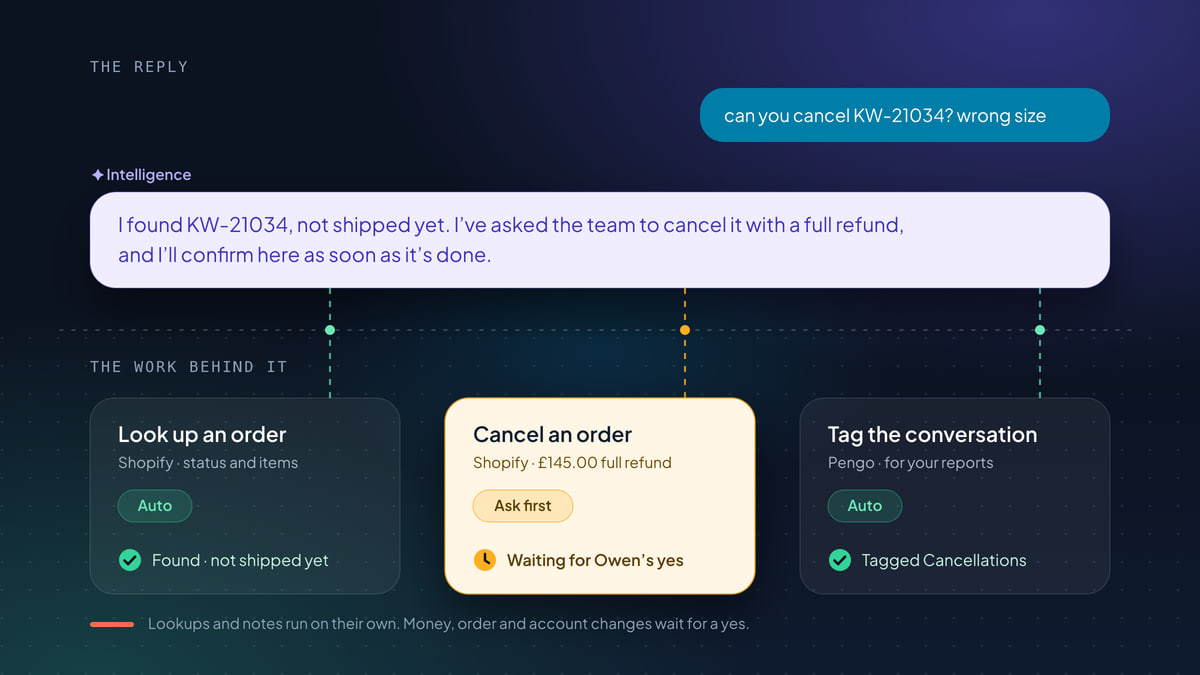
The fix is to sort actions by what’s at stake. Lookups and changes inside your help desk run on their own, because there’s nothing worth approving. Changes in your tools wait for a person, at least to start with. A few actions that need judgement are handed to a teammate outright. Then, over time, you use evidence to move the everyday cases to running on their own with limits.
If you’re still choosing which actions to switch on at all, our guide to AI that takes actions in customer support covers the four kinds of work and how to roll them out in phases.
What a good approval request contains
An approval request is a decision someone makes in a few seconds, often on a phone, often between other tasks. It has to carry everything needed to decide, and nothing that makes them go and look something up.
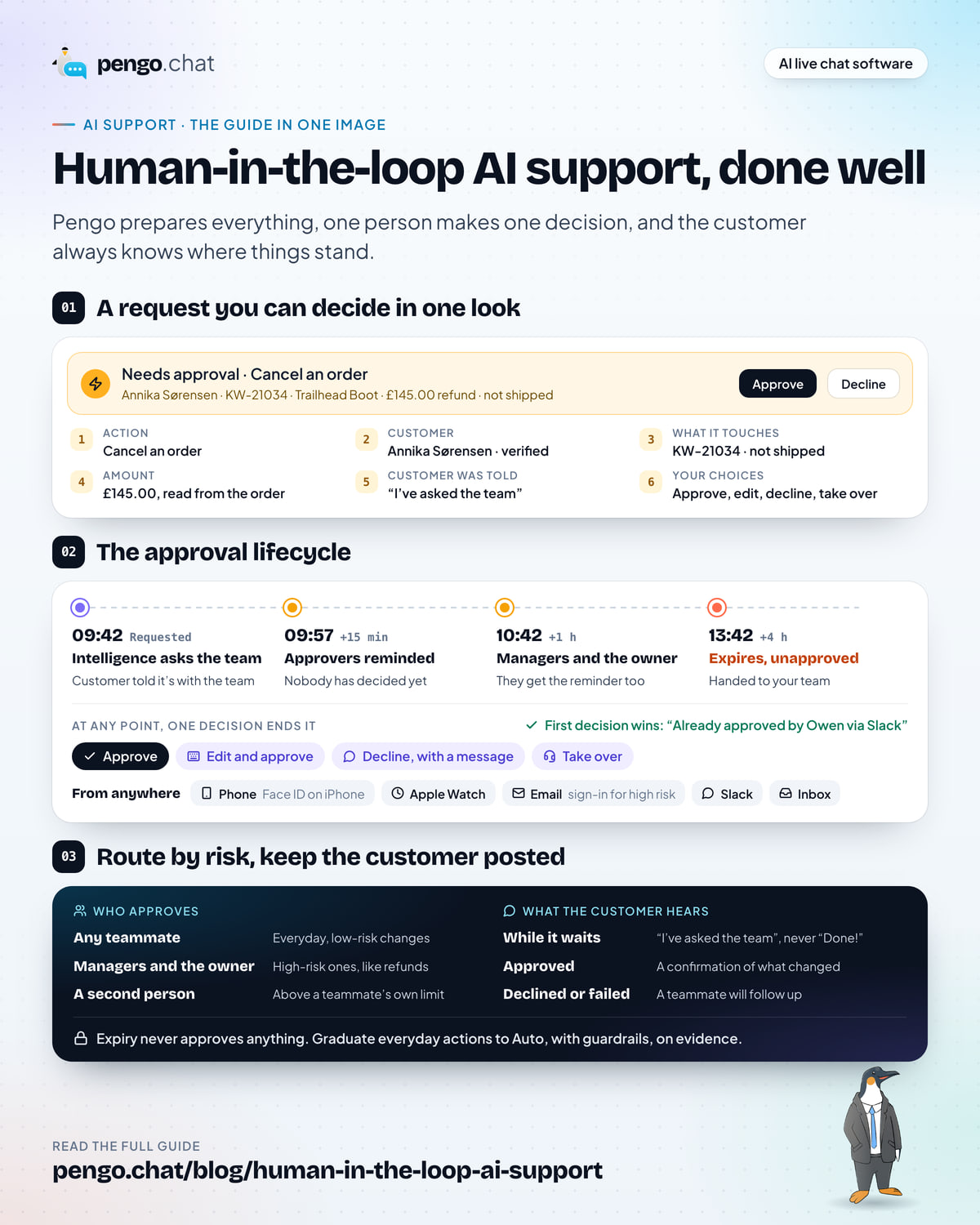
The inbox approval card reads: Needs approval, Cancel an order. Annika Sørensen, KW-21034, Trailhead Boot, £145.00 refund, not shipped, with Approve, Decline and Take over buttons. Below it, six numbered parts: Action, Cancel an order; Customer, Annika Sørensen, verified; What it touches, KW-21034, Trailhead Boot, not shipped; Amount, £145.00 full refund, read from the order; Customer was told, I've asked the team to cancel it; Your choices, approve, edit and approve, decline, take over.
Six things make a request decidable at a glance.
- The action, by its real name. “Cancel an order”, not “handle the customer’s request”. The approver should know exactly what Approve will do.
- The customer, and how sure you are it’s them. A cancellation for a signed-in, verified customer is a different decision from one for an anonymous visitor who typed an email address. The best systems don’t even raise the second kind: if the identity rule isn’t met, the action doesn’t run.
- What it touches. The order number, the item, and the state that makes the change possible (“not shipped”). If the order has already shipped, the request shouldn’t exist.
- The amount, from the order. The refund should be read from the order or invoice itself, never from what the customer said in the chat. “It was only £5” is not a source of truth.
- What the customer has been told. So the approver doesn’t contradict it, and knows the customer is waiting.
- The choices. Approve, edit and approve, reject, or take over. One decision, with room to adjust it.
Notice what’s missing: the whole conversation. The approver can open it if they want to, but they shouldn’t need to. If your requests regularly send people back to the transcript, the request is missing a detail.
Who approves
Not every approval needs the same person. Route requests by risk, the same way you’d route spending.
- Everyday changes, any teammate. Changing a shipping address before dispatch, skipping one subscription payment, adding a note to an order. Anyone working the inbox should be able to say yes.
- High-risk changes, managers and the owner. Refunds, cancellations, account credit and plan changes involve money and can’t easily be undone. Keep the yes with people who own those calls.
- Above a teammate’s limit, a second person. When a teammate runs a change themselves that goes past their own limit, another person approves it. This is the familiar four-eyes rule from finance, applied to support.
Two rules hold this together. First, the people who set the rules (which actions run on their own, which wait, who approves) should be a small group, typically the owner and managers. Second, identity rules should apply whatever the mode. Even an approved request shouldn’t run for a customer who doesn’t meet the action’s identity check.
Where people approve
An approval only helps the customer if someone sees it. A request sitting in a dashboard tab nobody has open is just slow support with extra steps.
So send requests to the places your team already looks, and let whoever is free decide.
| Where | Good for | What to expect |
|---|---|---|
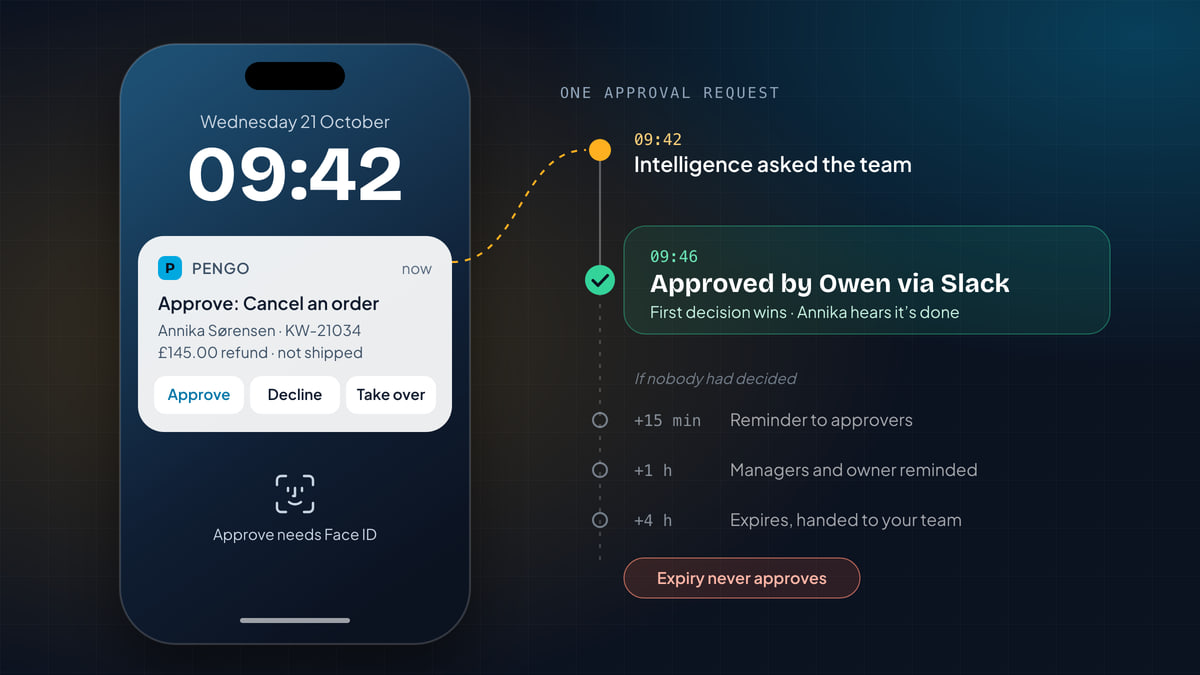
| Phone notification | Owners and leads away from their desk | Approve, decline or take over from the notification. On iPhone, Approve needs Face ID or your passcode. |
| Apple Watch | A quick yes between other things | Approve or decline from your wrist. |
| People who live in their inbox | Open the request and confirm on a secure page. High-risk changes ask you to sign in. | |
| Slack | Teams that coordinate in a channel | Approve, decline or take over from the message. |
| Support inbox | Whoever is working the conversation | Approve, edit the details and approve, decline, or take over. |
Sending one request to several places raises an obvious question: what if two people tap Approve? The answer should be simple. The first decision wins, and everyone else sees who decided and where. The action never runs twice, and nobody has to ask in the team chat whether it’s been handled.
Each person should choose where they get requests. A lead might want phone and Watch; a part-time teammate might want email only.
Approve, edit, decline or take over
A yes-or-no button is not enough. Real requests need four kinds of decision.
Approve when the request is right as prepared. This should be the common case, and the one you measure: a high rate of unchanged approvals is your evidence that an action is ready to run on its own.
Edit and approve when the request is nearly right. A partial refund instead of a full one, a different address line, the shipping refunded rather than the whole order. Editing keeps the AI’s preparation and the customer’s momentum, with your correction on top.
Decline, with a message when the answer is no. A decline shouldn’t leave the customer hanging. Add a short message and it goes to them in the conversation: “We can only refund unworn boots, but Hannah will be in touch about a repair or replacement” lands far better than silence.
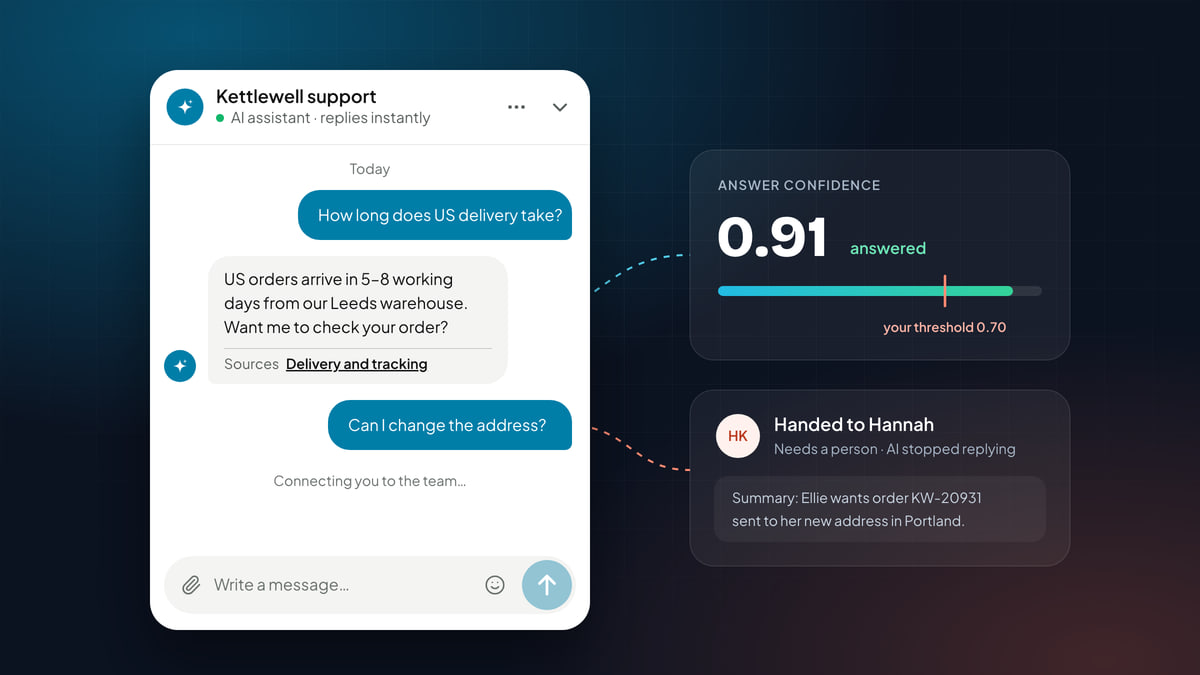
Take over when the request opens a conversation a person should have. A cancellation that sounds like frustration, a refund request with a complaint attached. Taking over claims the chat, tells the customer a teammate is joining, and keeps the action ready so you can still run it when you’re done talking.
What the customer sees, while waiting and after
This is where human-in-the-loop either feels fast or feels like a queue. The customer doesn’t see your approval flow. They see the chat. Three rules make waiting feel like progress.
Say it’s with the team, not that it’s done. The AI should never announce an outcome before it happens. “I’ve asked the team to skip your next payment, and I’ll confirm here as soon as it’s done” is honest and specific. “Done!” followed by a rejection is the fastest way to lose a customer’s trust.
Follow up with exactly what happened. Approved and done: a confirmation of the change. Rejected: a teammate reviewed it and will follow up. Couldn’t be completed (the tool refused, an integration was disconnected): a teammate will follow up. The follow-up should be a fixed message or built from the action’s own result, never improvised by the AI, so it can’t say more than what actually happened.
Reply where they are. The follow-up should go out on the customer’s channel, in their language, whether that’s the website chat, email or a messaging app.
Here’s one request from both sides. Ruth runs a small design agency and uses Tallybook for invoicing. She wants to skip August.
Left: Tallybook's chat widget. Ruth asks to skip next month's payment. The AI replies that it has asked the team to skip her next Growth payment and will confirm once it's done; at 10:19 it confirms the payment is skipped. Right: the inbox thread for Ruth Adebayo shows the same messages, an event 'Skip the next payment, waiting for approval', and 'Approved by Inês via Slack'. The approval card reads Needs approval: Skip the next payment, approved by Inês via Slack. Below, Owen's late tap shows Already approved by Inês via Slack.
Ruth never sees Inês, Slack or the approval banner. She sees a clear promise, then a confirmation that matches it. That’s the whole job of the customer-facing side.
Reminders and expiry: nothing waits forever
Every approval flow needs an answer to “what if nobody decides?” The wrong answers are “it waits indefinitely” (the customer is stuck) and “it approves itself after a while” (the approval was never real). The right answer is a ladder.
A four-step timeline. 09:42, requested: Intelligence asks the team and the customer hears it's with the team. 09:57, plus 15 minutes: approvers are reminded. 10:42, plus 1 hour: managers and the owner are reminded. 13:42, plus 4 hours: the request expires unapproved and the conversation is handed to the team. Below: at any point, approve, edit and approve, reject with a message, or take over; the first decision wins. A final note says expiry never approves anything.
The ladder matters for two reasons. It keeps the customer’s wait bounded, so a request raised at 09:42 is in a person’s hands by early afternoon at the latest, even on a chaotic day. And it makes the safety guarantee simple to explain to anyone: time running out never approves anything. The worst case is that a person handles it, which is where you started.
If you find requests regularly climbing the ladder, that’s a signal, not a nuisance. Either approvals aren’t reaching the right people, or the action is one your team doesn’t feel able to approve, and needs a clearer rule.
Team only: when a person should own it
Some actions shouldn’t go through approval at all, because the decision isn’t “is this request correct?” but “what should we do for this customer?”
A subscription cancellation is the classic example. You could approve it in a tap. But a short conversation might reveal that a pause would suit them better, or that one of your approved coupons would keep them. Goodwill credit after a bad experience is another: how much is a judgement about the relationship, not a check of the facts.
For these, the better pattern is to hand over with the work done. The AI tells the customer a teammate is joining, passes the conversation over, and leaves the action pre-filled and ready to run. The teammate has the conversation, then runs the action in one click, and the AI drafts the reply describing what was done.
Use the activity log to decide what graduates
Human-in-the-loop isn’t a permanent state for every action. It’s how you earn the evidence to automate the right ones.
Review the activity log weekly and sort each action’s requests into four piles:
- Approved unchanged. A long run of these, with no rejections, is the case for moving the action to running on its own.
- Edited before approval. The AI is missing context. Fix the content, the rule or the integration before you automate anything.
- Rejected. Read the reasons. Often it’s a policy the AI doesn’t know yet, or a request that should never have been raised.
- Approved but failed. Rarely the AI’s fault. Usually a disconnected integration, a missing permission, or the tool refusing the change, such as cancelling an order that has already shipped. Fix it once.
When an action graduates, don’t flip it straight to running unlimited. Add guardrails: run on its own up to an amount, ask above it, and cap how much it can do in a day. The amount should come from the order or invoice, never from the chat. Then keep reviewing. The everyday £8.00 refund for a missing pair of socks runs on its own; the £79 one for a whole Fellside Daypack still waits for a manager.
What good tooling looks like
Everything above depends on the tool giving you the controls. When you compare options, check for these:
| Capability | Why it matters |
|---|---|
| A mode per action | Lookups run free, changes wait, judgement calls go to a person. One switch for “AI on” is not enough. |
| Requests that carry the facts | Customer, action, record, amount from the order. Nobody should need another tab to decide. |
| Risk-based approvers | Any teammate for everyday changes, managers for high-risk ones, a second person above a limit. |
| Approvals everywhere | Phone, watch, email, Slack and inbox, with the first decision winning. |
| Edit, decline with a message, take over | Real decisions aren’t just yes or no. |
| Honest customer messages | “Asked the team” while waiting, follow-ups built from what actually happened. |
| Reminders and expiry that never approves | Nothing waits forever, and nothing approves itself. |
| A full record | Every run, approval and rejection, with who decided. |
Pengo Actions are built around this list. Pengo prepares changes in Shopify, WooCommerce, BigCommerce, Stripe and HubSpot, shows each request in the inbox as Needs approval with the details and Approve, Decline or Take over, lists waiting requests in the Approvals tab of Intelligence › Actions, and sends them to phone, Apple Watch, email and Slack. Every action Pengo runs or requests is in the Activity tab, and every run, approval and rejection is logged with who decided. Identity is checked every time, whatever the mode, and customers always know where their request stands. It all runs on Pengo Intelligence, the assistant that answers from your content and hands off cleanly when it should.
Mistakes we see most often
- Approving lookups. If an action can’t change anything, approval is noise. It trains people to tap Approve without reading, which is exactly the habit you don’t want on refunds.
- Requests that need a second tab. If an approver has to open the store admin to check the amount or the shipping status, the request is missing facts.
- One approver for everything. A single person who has to clear every request becomes the bottleneck the AI was meant to remove. Spread everyday approvals across the team.
- Telling the customer it’s done before it is. The waiting message is a promise. Keep it honest and specific.
- Letting requests approve themselves. A timeout that approves is not a safety net. Remind, escalate, then hand to a person.
- Never graduating anything. If nothing ever moves to Auto, your team has swapped doing tasks for approving them. Use the evidence.
Your approval set-up checklist
Human-in-the-loop set-up checklist
0 of 10 done
The best human-in-the-loop set-up is one your customers never notice and your team barely feels. The AI does the legwork, a person makes the call in seconds from wherever they are, and the customer gets a clear promise followed by a confirmation that matches it. Start strict, read what your team approves, and let the evidence decide what needs a human next month.