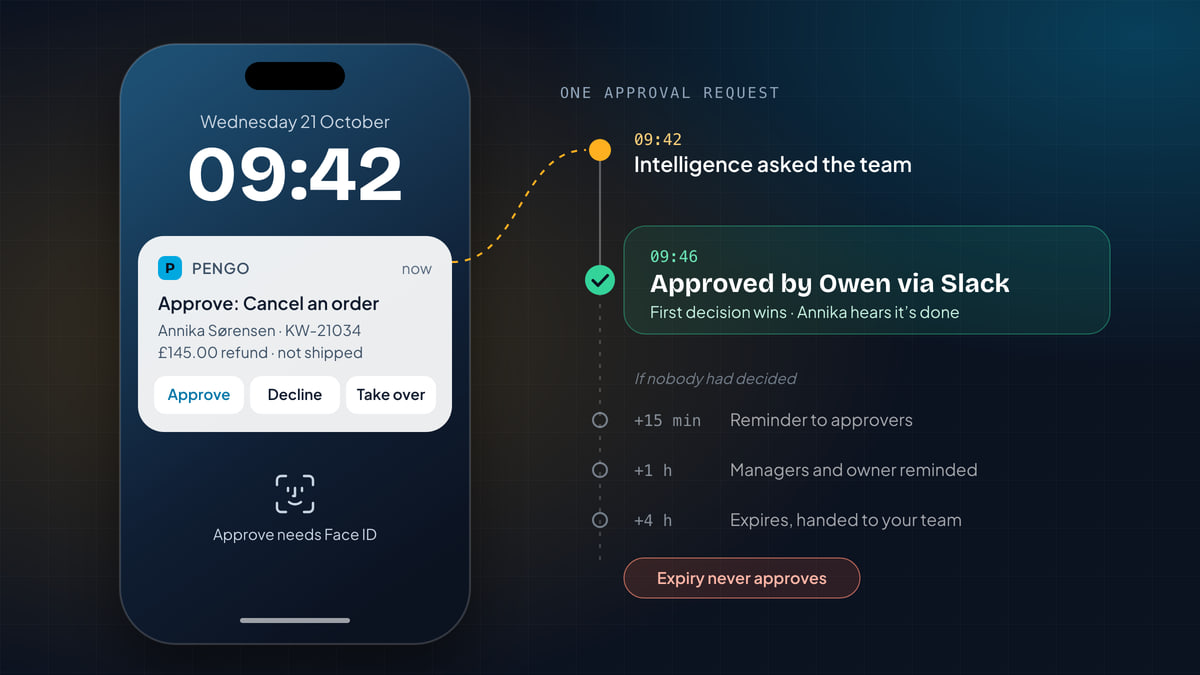
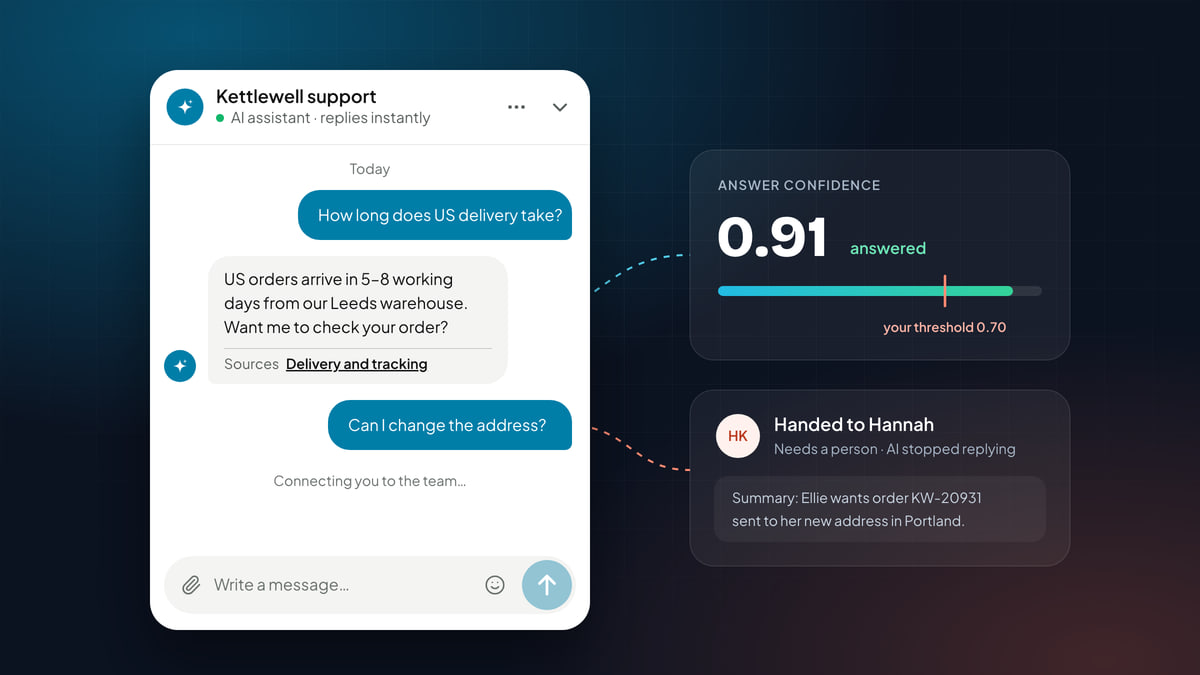
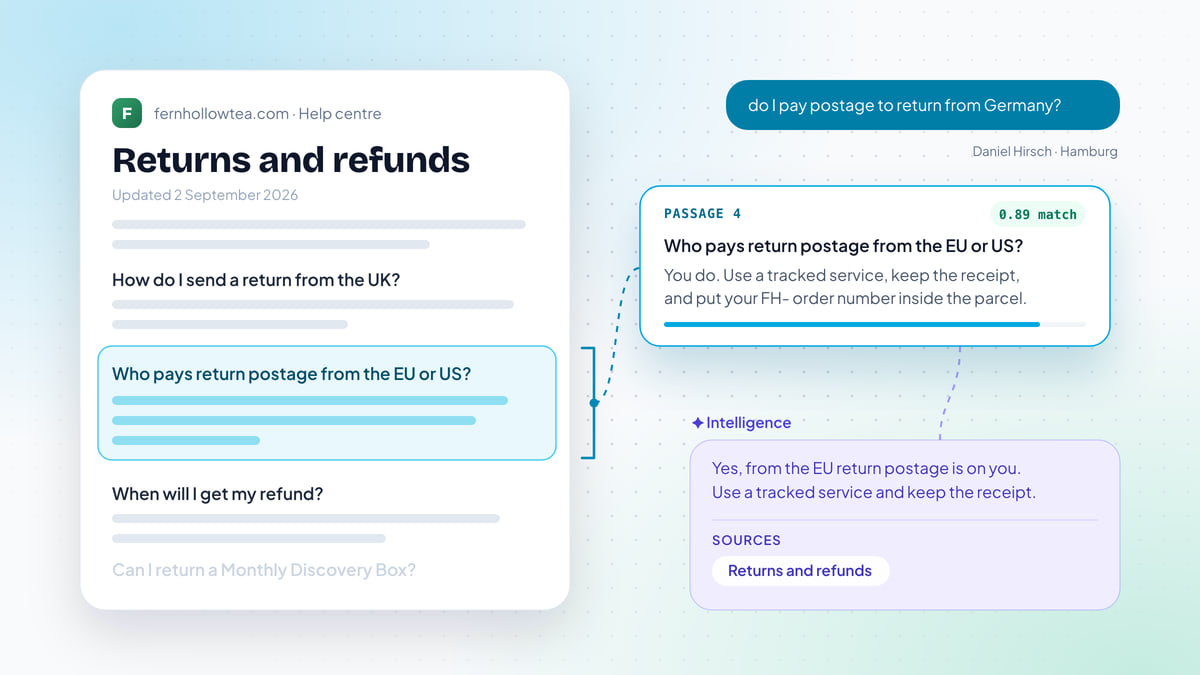
AI that takes actions in customer support: what to automate, what to approve, and how to roll it out
Action-taking AI does the work behind a reply: refunds, cancellations, address changes. What to run on its own, what to approve, and how to roll it out safely.

On this page
Key takeaways
- An AI that only answers still leaves the work for a person. Action-taking AI does the work behind the reply: it looks up the order, cancels it, refunds it, and tells the customer what happened.
- Sort every action into four kinds: lookups, changes inside your help desk, changes in your tools, and things a person should own. Each kind deserves a different default.
- Decide what runs on its own with four questions: how risky is it, can it be undone, does money move, and how sure are we who the customer is.
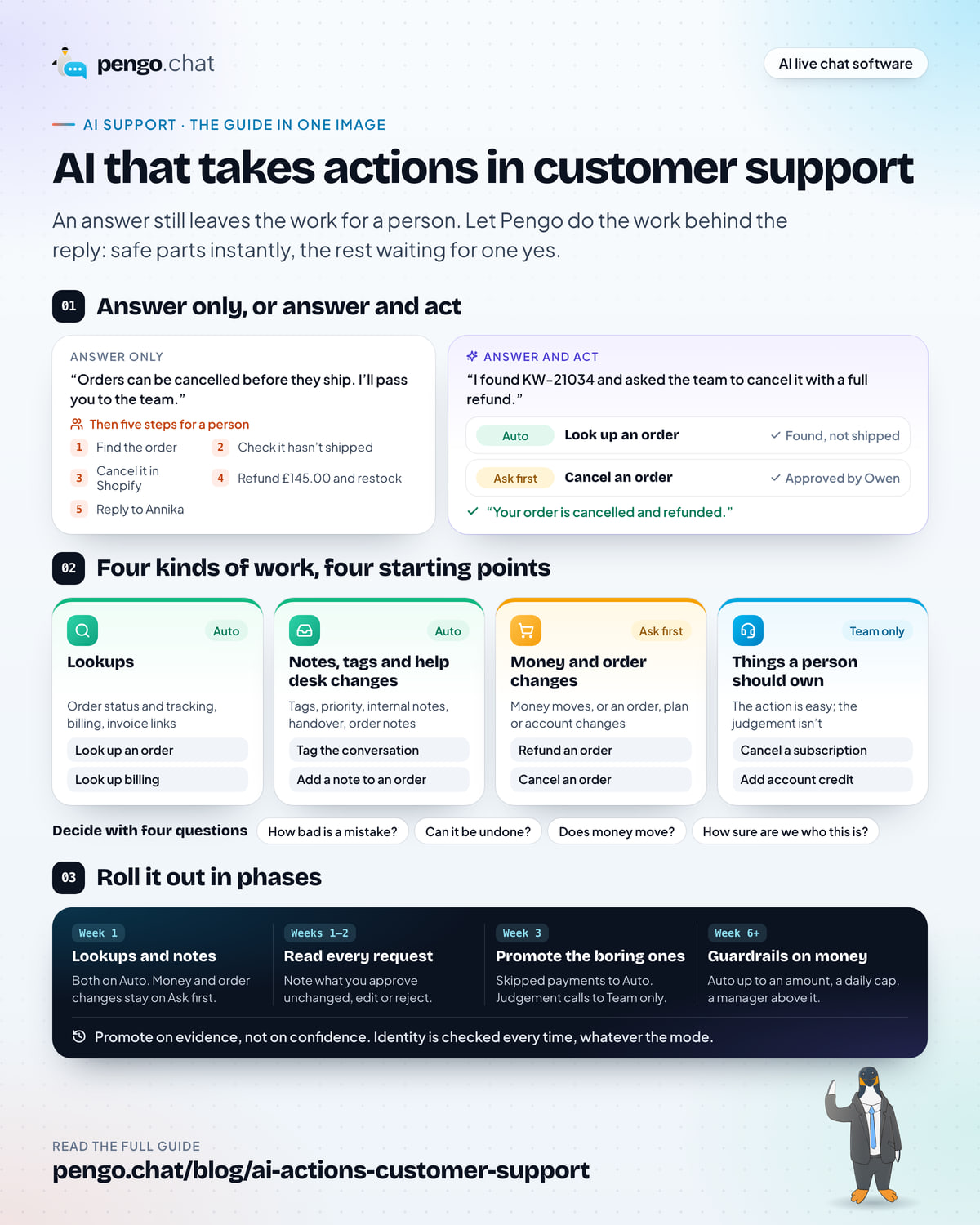
- Roll out in phases. Lookups, notes and tags on Auto first, every change that moves money or alters an order on Ask first, then add guardrails so the everyday cases move to Auto while the big ones still wait for a yes.
- Measure resolution including the work done, how fast approvals come back, and treat rejections and failures as signals, not noise.
An AI assistant that answers well is a real step forward. It knows your returns policy, cites the page it came from, and hands off when it isn’t sure. But look at what happens next in most conversations. The customer asks to cancel an order. The AI explains how cancellations work, passes the chat to the team, and a person opens Shopify, finds the order, cancels it, refunds it and writes back.
The answer was instant. The work still took a person.
That gap is where the next step in AI support sits: an assistant that does the work behind the reply. This guide covers what that means in practice, which work to let it do, how to decide what runs on its own and what waits for a yes, and how to roll it out without a single nervous week.
What “AI that takes actions” means
Two things separate it from the AI assistants most teams already know.
The first is access. An answering assistant reads your help content. An action-taking one also reads and writes to the systems where your customers’ orders, subscriptions and records live.
The second is permission. Because it can change things, every action needs a rule: run on its own, wait for approval, leave it to a person, or never. Those rules are where all the real decisions are, and they’re what the rest of this guide is about.
If you haven’t set up the answering side yet, start with our guide to setting up an AI agent for customer support. Everything here builds on an assistant that already answers from your content and hands off cleanly.
Answer only, or answer and act
Here is the same request, handled two ways. Annika ordered the wrong size of Trailhead Boot from Kettlewell Outdoor this morning and wants to cancel it.
Two chat widgets. In the first, the AI explains that orders can be cancelled before they ship and passes the chat to the team, leaving five tasks: find the order, check it hasn't shipped, cancel it in Shopify, refund £145.00 and restock, and reply. In the second, the AI finds KW-21034, says it has asked the team to cancel it with a full refund, and four minutes later confirms the order is cancelled and refunded. Look up an order ran on Auto; Cancel an order ran on Ask first and was approved by Owen.
Both answers are accurate. Both are polite. Only one of them finishes the job.
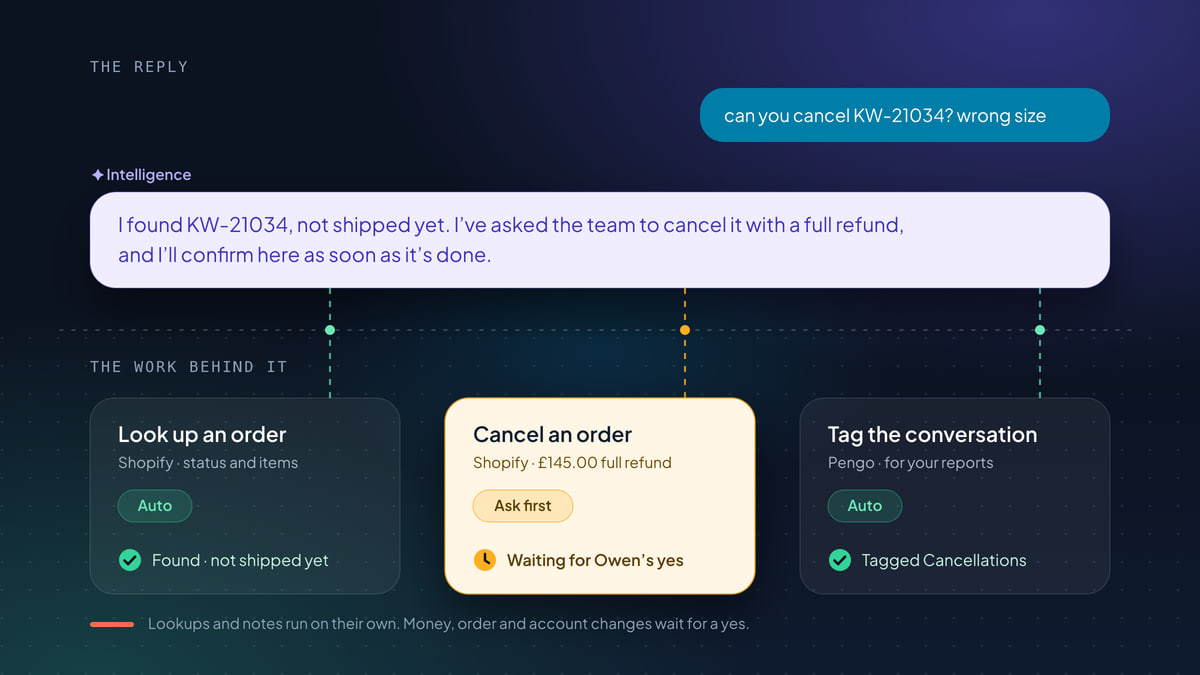
Notice what the right-hand assistant does not do. It doesn’t say “Done!” before anything has happened. It found the order on its own, because looking something up changes nothing. Then it asked the team, because cancelling an order refunds money and restocks items. It told Annika exactly that, and it confirmed only once the cancellation had actually gone through.
That’s the pattern to aim for: do the safe parts instantly, prepare the rest so a person only has to say yes, and never tell the customer more than what’s true.
The four kinds of work
Not every action is the same, and treating them all the same is how teams end up either nervous or slow. Sort them into four kinds.
| Kind of work | Examples | Can it go wrong? | Sensible start |
|---|---|---|---|
| Lookups | Order status and tracking, billing summary, invoice link, CRM contact | Only by showing data to the wrong person, so the identity check matters | Runs on its own |
| Changes inside your help desk | Tag the conversation, set priority, leave an internal note, hand over to the team | Barely. Nobody outside your team sees them, and they’re undone in a click | Runs on its own |
| Changes in your tools | Cancel or refund an order, change a shipping address, skip or pause a subscription, update a CRM record | Yes. Money moves, parcels go places, records change | Waits for a person’s yes |
| Things a person should own | A subscription cancellation you’d like to save, goodwill credit, a plan change with a sales angle | The action is easy; the judgement isn’t | A teammate runs it, with everything filled in |
The first two kinds are where an AI earns trust quickly. Lookups turn “where’s my order?” into an answer with a tracking link in seconds. Internal changes keep your inbox organised without anyone touching it.
The third kind is where the value is, and also where the care is. These are the requests your team spends its day on: the cancellation, the refund for a damaged parcel, the address typo caught before dispatch.
The fourth kind is easy to forget. Some actions are simple to run but shouldn’t be decided by software. A customer cancelling a subscription might stay for a pause. A complaint after an outage might deserve credit, and how much is a judgement call. You still want the action ready and pre-filled. You just want a person to own the moment.
Where it pays off first
The best first actions are the requests your team handles by hand every day, follow the same steps every time, and make customers wait for no good reason. Two examples from very different businesses.
An online shop. At Kettlewell Outdoor, a walking boots and outdoor clothing store shipping from Leeds, the repetitive work looks like this:
- “where’s my order?”: a lookup, with the status, the items and the tracking link
- “I moved last week, can you change the address?”: a change in the store, possible only before it ships
- “one pair of socks was missing”: a partial refund, with the reason noted on the order
- “I ordered twice by mistake”: a cancellation of the unshipped duplicate, refunded and restocked
- “can I leave it with a neighbour?”: a note on the order for the warehouse
A subscription business. At Tallybook, invoicing software for small agencies, it’s billing:
- “when’s my next payment?”: a billing lookup for a signed-in customer
- “can you resend last month’s invoice?”: the invoice link, or the invoice emailed again
- “I’ve updated my card, can you try again?”: a retry on the failed payment
- “we’re quiet in August, can we skip a month?”: one billing cycle skipped, resuming on its own
- “we’ve grown, can we move to Scale?”: a plan change, only to plans you’ve approved
Every one of these is a request where the answer alone isn’t what the customer wanted. They wanted the thing done. And every one has an obvious, checkable source of truth (the order, the invoice, the subscription), which is exactly what makes them safe to hand to an AI with the right rules.
Contrast that with requests that look similar but aren’t. “Your boots gave me blisters on day one” is a complaint, not a refund. “I want to cancel, this is the third late delivery” is a retention conversation. Those belong with a person, even if the action at the end is the same.
How to decide what runs on its own
For each action, ask four questions.
- How bad is a mistake? A wrong tag costs nothing. A wrong refund costs money and an awkward email.
- Can it be undone? Skipping one subscription payment undoes itself next cycle. A cancelled, refunded and restocked order doesn’t come back.
- Does money move? Refunds, credit, coupons and plan changes all touch revenue directly. They deserve a limit, even when they’re routine.
- How sure are we who this is? Some actions are safe for any visitor (booking a demo, opening a ticket). Others should only ever run for a customer who is signed in and verified.
The more “yes, it’s serious” answers an action collects, the further right it moves on the map below. Pick any action to see where it starts, who it runs for, and why most teams settle it where they do.
Auto Runs on its own
Ask first Waits for a yes
Team only A person owns it
Look up an order Shopify, WooCommerce, BigCommerce
- Starts on
- Auto
- Risk
- Low
- Who it runs for
- Order number and email
- Where it settles
- Auto
It reads, it never changes anything, and the identity check means nobody sees an order that isn’t theirs. There is nothing for a person to approve.
Look up billing Stripe
- Starts on
- Auto
- Risk
- Low
- Who it runs for
- Verified customers only
- Where it settles
- Auto
Read-only, so it can run on its own. Billing is private, so it only ever runs for a customer who is signed in and verified.
Tag the conversation Pengo
- Starts on
- Auto
- Risk
- Low
- Who it runs for
- Any visitor
- Where it settles
- Auto
It stays inside Pengo, the customer never sees it, and a wrong tag is undone in a click. Waiting for approval would cost more than any mistake.
Book a meeting Cal.com, Calendly, Google Calendar
- Starts on
- Auto
- Risk
- Medium
- Who it runs for
- Any visitor
- Where it settles
- Auto
The visitor picks from times you have already said are free. Asking a person to approve a demo booking just slows the lead down.
Add a note to an order Shopify, WooCommerce, BigCommerce
- Starts on
- Auto
- Risk
- Low
- Who it runs for
- Order number and email
- Where it settles
- Auto
It adds to the order without changing it, and a wrong note is easy to correct. A delivery instruction is only useful if it reaches the order before it’s packed, so it starts on Auto.
Skip the next payment Stripe
- Starts on
- Ask first
- Risk
- Medium
- Who it runs for
- Verified customers only
- Where it settles
- Ask first
It touches billing, but it undoes itself: billing resumes on its own after one cycle. Approve a few, then consider Auto.
Change a shipping address Shopify, WooCommerce, BigCommerce
- Starts on
- Ask first
- Risk
- Medium
- Who it runs for
- Verified customers only
- Where it settles
- Ask first
Only possible before the order ships, and a wrong address means a lost parcel. A quick look from a person is worth the minute it takes.
Refund an order Shopify, WooCommerce, BigCommerce
- Starts on
- Ask first
- Risk
- High
- Who it runs for
- Verified customers only
- Where it settles
- Ask first
Money leaves your account and does not come back. Keep it on Ask first, then add a guardrail so small refunds run on Auto and larger ones still wait for a manager.
Cancel an order Shopify, WooCommerce, BigCommerce
- Starts on
- Ask first
- Risk
- High
- Who it runs for
- Verified customers only
- Where it settles
- Ask first
It refunds in full and restocks the items in one step. Pengo prepares everything, so the approval is a single tap.
Cancel a subscription Stripe
- Starts on
- Ask first
- Risk
- High
- Who it runs for
- Verified customers only
- Where it settles
- Team only
A cancellation is often a conversation worth having. On Team only, Pengo hands over with the cancellation ready, and a teammate can offer a pause first.
Add account credit Stripe
- Starts on
- Ask first
- Risk
- High
- Who it runs for
- Verified customers only
- Where it settles
- Team only
How much goodwill an outage deserves is a judgement call. Let a person decide, with the action filled in and ready to run.
Change plan Stripe
- Starts on
- Ask first
- Risk
- High
- Who it runs for
- Verified customers only
- Where it settles
- Team only
Plan changes come with proration and, often, a sales conversation. Pengo only ever offers plans you have approved, and a teammate runs it.
Three lanes. Auto: Look up an order, Look up billing, Tag the conversation, Book a meeting, Add a note to an order. Ask first: Skip the next payment, Change a shipping address, Refund an order, Cancel an order. Team only: Cancel a subscription, Add account credit, Change plan. The selected example, Refund an order, starts on Ask first, is high risk, runs for verified customers only, and is best kept on Ask first with a guardrail so small refunds run on Auto.
Two things fall out of this exercise.
Identity is separate from mode. Whether an action runs on its own or waits for approval, it should still check who it’s for, every time. An order lookup on Auto should need the order number and the email on the order, or a verified sign-in. Otherwise anyone who knows an email address can read someone else’s order history.
Amount is part of risk. “Refund an order” isn’t one risk level. Refunding the shipping on a late parcel is not the same decision as refunding a whole Ridgeline Rain Shell. That’s what guardrails are for, and we’ll come to them in the rollout.
Roll it out in phases
The safest rollout is also the fastest, because nobody has to stop and argue about it. You start with the parts that can’t hurt, watch what happens, and promote actions one at a time on evidence.
-
Week 1: connect your tools, lookups on Auto
Connect your store, billing or CRM. Let lookups run on their own: order status, tracking, billing summaries. These alone replace a lot of copy and paste with real data from your tools. Notes and tags start on Auto too, because they’re small and easy to correct. Leave every change that moves money or alters an order on Ask first.
-
Weeks 1–2: changes on Ask first, and read every request
Each time the AI wants to cancel, refund or change something, a teammate approves or rejects it. This is your training data. Note which requests you approve without touching, which you edit, and which you reject.
-
Week 3: promote the boring ones
Actions you’ve approved unchanged, again and again, are candidates for Auto. Small changes that undo themselves, like skipping one subscription payment, usually go first. Move anything a person should own, like subscription cancellations you’d rather talk through, to Team only.
-
Week 6 onwards: add guardrails to the money
For refunds and similar actions, don’t flip the whole thing to Auto. Let it run on its own up to an amount you’re comfortable with, cap how much it can do in a day, and keep everything above that limit waiting for a manager.
Here is what that looks like in the settings, week by week.
Three snapshots of Intelligence › Actions, Actions tab. Week 1: Look up an order and Add a note to an order on Auto; Skip the next payment, Refund an order and Cancel a subscription on Ask first. Week 3: Skip the next payment moves to Auto and Cancel a subscription to Team only. Week 6: Refund an order moves to Auto, with a guardrail of Auto up to £20, ask above, and a daily cap.
The rule of thumb: promote on evidence, not on confidence. “It seems fine” is not a reason to move refunds to Auto. “We approved 40 of these unchanged and rejected none” is.
Guardrails matter here because they let you automate the common case without betting on the rare one. When the AI works out the amount, it should take it from the order or invoice itself, never from what the customer typed. A customer saying “it was only an £8 pair of socks” doesn’t make a £129 refund small.
What customers should see
The customer doesn’t care about your modes. They care whether their request is handled and whether they can believe what they’re told. Three moments matter.
While it waits. If an action needs approval, the AI should say it has asked the team, not that it’s done. “I’ve asked the team to cancel it with a full refund, and I’ll confirm here as soon as it’s done” is honest, specific, and sets the expectation that the answer will arrive in the same chat.
When it’s decided. The follow-up should match exactly what happened. Approved and done: a confirmation that the order is cancelled and refunded. Rejected: a teammate reviewed it and will follow up. Couldn’t be completed: it didn’t go through automatically, and a teammate will follow up. The safest follow-ups are fixed messages or built from the action’s own result, never improvised by the AI, so they can’t say more than what actually happened.
Where they are. The follow-up should reach the customer on the channel they used, in the language they wrote in.
The waiting part is where human-in-the-loop design makes or breaks the experience. If you want to go deeper on approvals, reminders and who decides, read our guide to human-in-the-loop AI support.
How to measure it
The metrics from an answering assistant still apply. A few new ones matter once the AI does work.
- Resolution, including the work. A conversation where the AI explained the cancellation policy and handed off is not resolved. Count a conversation as resolved when the customer’s request was actually completed (the order cancelled, the address changed) and they didn’t come back about it.
- Approval turnaround. How long requests on Ask first wait before someone decides. This is the customer’s waiting time, so watch it as closely as first response time. If it’s slow, fix where approvals reach people before you reach for Auto.
- Approved unchanged, edited, rejected. For each action, track how often a person approves it as prepared, edits it first, or rejects it. A long run of unchanged approvals is the evidence you need to promote it. Frequent edits mean the AI is missing context. Rejections tell you where your rules or your content need work.
- Failures and their causes. Actions that were approved but failed are rarely the AI’s fault. They point at a disconnected integration, a missing permission, or a tool refusing the change, such as an order that has already shipped. Each one is a fix to make once.
Review this weekly, at the same time you read through your AI conversations. Fifteen minutes on the activity log tells you more than any dashboard about whether to move an action, add a guardrail, or leave it alone.
What to look for in a tool
Action-taking AI is only as safe as the controls around it. When you compare tools, check for these.
| Capability | Why it matters |
|---|---|
| A mode per action | You decide action by action, not “AI on” or “AI off”. Lookups run free while refunds wait. |
| Cautious defaults | Anything that moves money or changes an order in another tool should start waiting for a person, so nothing surprises you on day one. |
| Identity rules per action, checked every time | The right customer, every time, whatever the mode. |
| Guardrails on amounts and volume | Automate the small refund without automating the big one. Amounts come from the order, not the chat. |
| Approvals people actually see | Requests that sit unseen in a queue are just slow support. Look for approvals on phone, watch, email, Slack and in the inbox. |
| Honest customer messages | “I’ve asked the team” while waiting, and follow-ups built from what actually happened. |
| Actions for your team too | Teammates should be able to run the same actions in one click, with the customer and order filled in. |
| A full record | Every run, approval and rejection, with who decided. |
| Least-access connections | Only the permissions each integration needs, keys encrypted, and signed requests to your own backend. |
Pengo Actions were built around exactly this list. Pengo looks up and changes orders in Shopify, WooCommerce and BigCommerce: cancelling an unshipped order with a full refund and restock, refunding in full or in part, changing an address before it ships, or sending a single-use discount code. In Stripe it skips, pauses, resumes and cancels subscriptions, retries failed payments and refunds charges, and coupons and plan changes come only from the lists you approve. It opens tickets and logs notes in HubSpot, books meetings from Cal.com, Calendly or Google Calendar, and calls your own backend through signed custom connectors.
Every action has its own mode, its own identity rule and, where money moves, its own guardrails. Approvals reach your team on their phone, Apple Watch, email, Slack or the inbox, and the first decision wins. While your team chats, the inbox Actions button ranks the actions that fit the conversation, with the customer, order and amount already filled in, so a teammate runs it in one click and Pengo drafts the reply. Everything is logged in the Activity tab of Intelligence › Actions. All of this runs on Pengo Intelligence, the same assistant that answers from your content and cites its sources.
Mistakes we see most often
- Turning everything on at once. The point of a phased rollout is evidence. Skip it and the first odd refund becomes a reason to switch the whole thing off.
- Treating identity as optional on lookups. “It’s only reading” is how order details leak. Lookups need identity rules as much as changes do.
- Letting the AI announce things before they happen. “Your order is cancelled!” followed by a rejection is worse than no automation at all.
- Taking amounts from the chat. Always from the order or invoice. Always.
- Ignoring approval speed. Ask first is only safe if it’s also quick. A request that waits three hours is a three-hour first response.
- Never promoting anything. If everything stays on Ask first forever, your team has swapped typing replies for clicking Approve. Use the evidence and move the boring actions to Auto.
Your rollout checklist
Action-taking AI rollout checklist
0 of 11 done
An AI that answers is a good start. An AI that finishes the job, safely, is what customers actually notice: the refund lands, the parcel goes to the right address, and nobody had to ask twice. Start with the lookups, keep every change that moves money waiting for a yes, and let the evidence tell you what to automate next.