Does your chat widget slow down your website? How to measure it
What a live chat widget loads, how it affects LCP, INP and CLS, and a step-by-step way to measure your own with DevTools, Lighthouse, WebPageTest and field data.

On this page
- What a chat widget actually loads
- How a chat widget affects Core Web Vitals
- Why download size is only part of the story
- What is a widget facade?
- How to measure your own chat widget
- What “good” looks like for a chat widget
- Questions to ask a chat vendor about speed
- If your current widget is the problem
- The bottom line
Key takeaways
- A chat widget can slow your site, but how much depends on what it loads before anyone uses it, not on the vendor's name. Measure it on your own pages.
- Watch the three Core Web Vitals: LCP (good is 2.5 s or less), INP (200 ms or less) and CLS (0.1 or less). A widget can hurt each one in a different way.
- Download size is only part of the cost. JavaScript also has to be parsed and run on your visitor's phone, and that work can block taps and scrolls.
- The best widgets use a facade: a tiny script paints the chat bubble, and the real chat loads only when a visitor shows interest.
- To measure, compare the same page with the widget and with its domain blocked, in DevTools, Lighthouse and WebPageTest, then confirm with field data from real visitors.
You add a chat widget to your site to help visitors, and a week later someone runs PageSpeed Insights and the score has dropped. Or your developer says “it’s the third-party scripts” and you’re not sure whether the chat is one of the guilty ones.
The real answer is that a chat widget can slow a site a lot, a little, or hardly at all. It depends on what the widget loads before anyone uses it, and when. You don’t have to take a vendor’s word for which kind you have, either. Everything in this guide can be measured on your own pages in under an hour, with free tools.
What a chat widget actually loads
When you paste a chat snippet into your site, you’re usually adding one small script tag. That tag is the start of a chain, not the whole thing. Depending on the product, it can go on to fetch:
| What | Why it’s there | What it can cost |
|---|---|---|
| Loader script | The file your snippet points to. Decides what to load next. | A request to a new domain, plus JavaScript to run |
| Main app bundle | The chat interface itself: message list, composer, forms | Usually the largest download, and the most JavaScript to run |
| Stylesheets and fonts | So the widget looks the same on every site | More requests; fonts can be large |
| Iframe | Keeps the chat’s code and styles separate from your page | A whole extra document, with its own scripts and styles |
| Live connection | A websocket or polling connection for real-time messages | Network use and some ongoing work in the background |
| Images | Team avatars, logos, icons | Small individually; they add up |
| Tracking and settings | Visitor tracking, settings, unread counts, proactive message rules | More requests and more code running during load |
None of this is wrong. A chat window needs code, styles and a connection. The question that matters for speed is which of these load the moment your page opens, for every visitor, and which wait until someone actually wants to chat. Most visitors to most pages never open the chat, so anything loaded up front is a cost they pay for nothing.
How a chat widget affects Core Web Vitals
| Metric | What it measures | Good | Poor | How a chat widget can hurt it |
|---|---|---|---|---|
| LCP, Largest Contentful Paint | When the largest image or text block in view finishes rendering | ≤ 2.5 s | > 4 s | Competes with your hero image for bandwidth and the main thread while the page loads |
| INP, Interaction to Next Paint | How long the page takes to respond visually to taps, clicks and key presses, across the whole visit | ≤ 200 ms | > 500 ms | Long stretches of widget JavaScript block the page from responding |
| CLS, Cumulative Layout Shift | How much visible content moves unexpectedly | ≤ 0.1 | > 0.25 | Bars, banners or launchers that push your content when they appear |
INP replaced First Input Delay as a Core Web Vital in March 2024. The difference matters for chat widgets. First Input Delay only measured the very first interaction, and only the wait before the browser started handling it. INP watches every interaction during the visit and measures all the way to the next frame on screen, so a widget that keeps the main thread busy after load now shows up in the score.
LCP: the widget competes with your content
Your largest piece of content is usually a hero image or a headline. While it’s loading, the browser is also fetching and running everything else on the page. A widget that downloads its full app, fonts and iframe during those first seconds is competing for the same connection and the same processor. On a fast laptop you’ll barely notice. On a mid-range phone on mobile data, it can push your LCP from good to “needs improvement”.
The worst case is a widget script placed in the <head> without async or defer. The browser stops building the page until that script has downloaded and run. Most vendors’ snippets are asynchronous now, but it’s worth checking, especially if someone pasted the snippet by hand years ago.
INP: the main thread can only do one thing at a time
The browser runs JavaScript on the same thread it uses to respond to visitors. Any task that takes longer than 50 milliseconds counts as a “long task”, and while it runs, a tap on your “Add to basket” button just waits. A widget that parses and initializes a large bundle in one go can create exactly those long tasks, often in the first few seconds when visitors are starting to scroll and tap.
Widgets can also add ongoing work: listeners on scroll and mouse movement for tracking, timers for proactive messages, re-renders when a message arrives. Each is small, but they run on the same thread as your page.
CLS: anything that moves your content counts
Layout shift happens when visible content changes position without the visitor causing it. A chat bubble that floats in the corner shouldn’t move anything. Problems come from widgets that insert something into the page’s flow: a “Chat with us” bar above your header, an inline prompt that appears between paragraphs, or a launcher that’s positioned in the layout rather than floated above it.
Left: a sketch of a page where a chat bar appears under the navigation at 2.1 seconds and pushes the heading, text and Add to basket button down. Right: the same page with a round chat bubble fixed in the bottom-right corner and the content unmoved.
Why download size is only part of the story
Vendors who talk about widget weight usually quote kilobytes, and kilobytes are a good start. But a kilobyte of JavaScript costs more than a kilobyte of image, because after it arrives the browser has to parse it, compile it and run it. An image is decoded once, mostly off the main thread. A script is work on the thread that also answers your visitors’ taps.
Three other costs don’t show up in a size number at all:
- New domains. Each third-party domain needs its own DNS lookup and secure connection before the first byte arrives. A widget that pulls from three domains pays that set-up three times.
- Compressed versus uncompressed size. The network transfers the compressed (gzipped or Brotli) file. The browser parses the uncompressed one, which is often several times larger.
- Your visitors’ devices. Your laptop is probably much faster than the median phone your customers use. Test on a throttled profile, not on your desk.
Transfer time, at least, is simple arithmetic: size in bytes, times 8 for bits, divided by connection speed. Try it with any script you’re checking.
500 msto download, best case
100 KB × 8 = 800 kilobits ÷ 1,600 kbps
Uses 1 KB = 1,000 bytes and leaves out DNS, connection set-up and server time. The time the browser then spends parsing and running the script comes on top, and on a phone it can take longer than the download.
A calculator. With a 100 KB script on a slow 4G profile of 1.6 Mbps, transfer takes 0.50 seconds, against 17 milliseconds for Pengo's 3.4 KB facade.
Try typing in the sizes you find in the next section. A small difference on cable can be half a second on a slow mobile profile, before a single line of the script has run.
What is a widget facade?
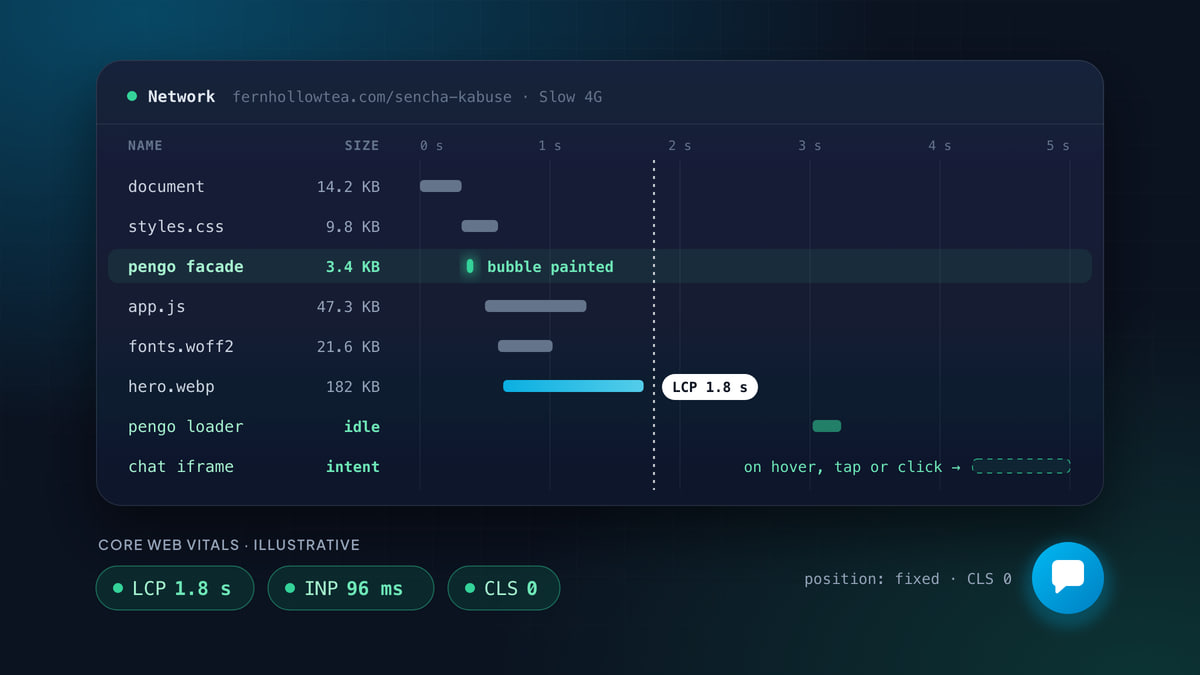
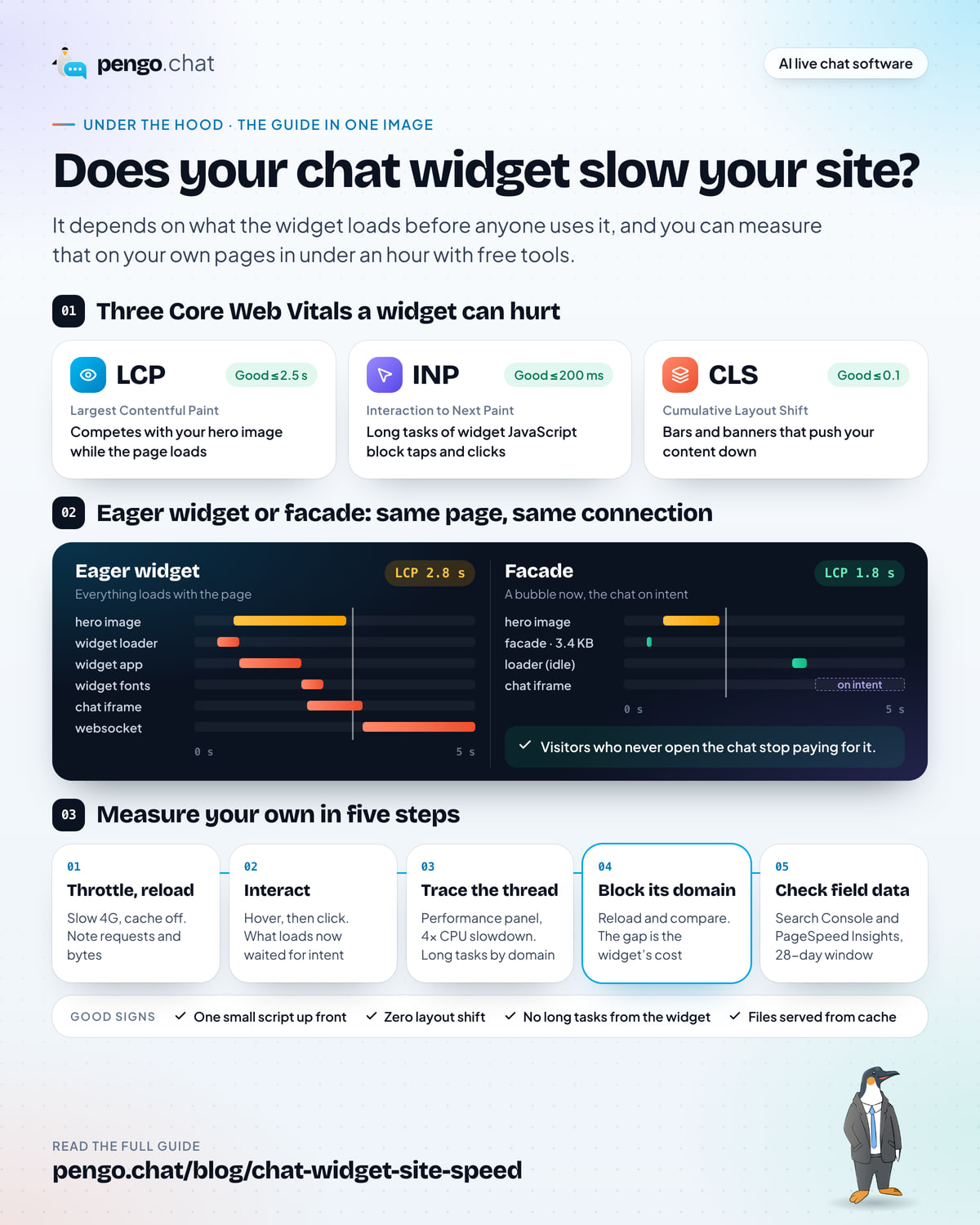
The most effective fix for widget weight is a pattern called a facade. Instead of loading the whole chat when the page opens, the page loads a very small script that draws something that looks like the chat launcher. The real widget loads only when there’s a sign the visitor wants it: they hover over the bubble, focus it with the keyboard, tap it, or a proactive message is about to open.
Google’s web.dev guidance recommends facades for heavy embeds like chat widgets and video players. The visitor sees the same bubble either way. The difference is that visitors who never open the chat stop paying for it.
Two network waterfalls on a 0 to 5 second axis. With an eager widget, the widget loader, app, fonts, chat iframe and websocket all load in the first three seconds, there is a long task on the main thread, and LCP lands at 2.8 seconds. With a facade, one 3.4 KB request loads early, the loader follows at about 3 seconds, the chat iframe waits for intent, and LCP lands at 1.8 seconds.
A good facade does three things:
- Paints immediately and cheaply. No iframe, no web fonts, no framework. Just enough to draw a button in the corner.
- Takes up no layout space. A fixed-position bubble can’t push content, so it adds nothing to CLS.
- Warms up politely. It fetches the next stage when the browser is idle, so the chat opens quickly when someone clicks, without competing with the page’s own loading.
How to measure your own chat widget
You can do all of this in Chrome on a laptop. Use a private window so browser extensions don’t add their own scripts, and pick a page that matters: your homepage, a product page or your pricing page. Kettlewell Outdoor, for example, would test the Trailhead Boot product page rather than the About page, because that’s where buyers land from search.
In Chrome DevTools
-
Open the Network panel with cache off and throttling on
Open DevTools (F12, or Cmd+Option+I on a Mac), go to Network, tick Disable cache, and set the throttling menu to Slow 4G. This approximates a first visit on a phone with patchy signal.
-
Reload and filter by the widget's domain
Reload the page and don’t touch anything. Type the widget’s domain into the filter box (for example
domain:*.vendor.com, or just part of the script name). The bar at the bottom shows how many requests matched and how much was transferred. Write down both numbers. This is what every visitor pays, chat or no chat. -
Check the types and the timing
Look at the Type column for scripts, stylesheets, fonts, documents (iframes) and websockets. Then look at the waterfall: did the widget’s requests start before your main image finished? Did any of them start before the page’s
loadevent? -
Now interact, and watch what loads
Hover over the chat bubble, then click it. New requests that appear now are the ones the widget saved for intent. A well-built widget loads most of its weight here, not in the previous step.
-
Record a Performance trace
Switch to Performance, set CPU throttling to 4x slowdown (or a mobile preset), and record a reload. Long tasks are marked with a red corner. In the Bottom-Up tab, group by domain to see how much main-thread time belongs to the widget’s domain compared with your own code.
-
Block the widget and compare
Back in Network, right-click one of the widget’s requests and choose Block request domain. Reload. The difference in requests, transferred bytes, LCP and long tasks between the two runs is the widget’s cost on this page.
-
Repeat with the cache on
Untick Disable cache and reload twice. Repeat visitors should pay far less, if the widget serves its files from cacheable URLs. If the same large files download again on every visit, note it.
In Lighthouse and PageSpeed Insights
Lighthouse (in DevTools, or built into PageSpeed Insights) loads your page on a simulated mid-range phone and reports LCP, CLS and Total Blocking Time. It can’t measure INP, because nobody taps anything during the test, so Total Blocking Time stands in for it: how long the main thread was too busy to respond during load. Lighthouse also lists third-party code with its transfer size and main-thread time, which is often the fastest way to see whether your chat widget is near the top.
Run it on the page with the widget, then without it: on a copy of the page without the snippet, or with the Lighthouse command line’s --blocked-url-patterns option pointed at the widget’s domain. Compare LCP, Total Blocking Time and CLS rather than the overall score, which moves for many reasons.
PageSpeed Insights adds something Lighthouse can’t: field data. If your site has enough traffic, the top of the report shows how real Chrome users experienced the page over the last 28 days, from the Chrome User Experience Report (CrUX). That’s where your real INP lives.
In WebPageTest
WebPageTest runs your page on real devices and browsers in different locations. Its advanced settings include a Block tab where you can block requests by domain or URL text. Run the page twice, once normally and once with the widget’s domain blocked, then use the comparison view to watch both filmstrips side by side. Seeing the hero image appear later in one strip than the other is more persuasive to a team than any score.
In your field data
Lab tests tell you what can happen. Field data tells you what does. Check the Core Web Vitals report in Google Search Console, which groups your URLs by status, and the field section of PageSpeed Insights. Both use a rolling 28-day window, so when you add, remove or change a widget, give it up to four weeks before you judge the result.
If you’re an agency like Pell & Hart, run the blocked-versus-unblocked comparison on a client’s site before you add a chat widget, and keep the numbers. When Coldharbour Climbing asks six months later why the site feels slower, you’ll have a baseline to point to.
What “good” looks like for a chat widget
There’s no official budget for chat widgets, but after running the tests above, this is what we’d want to see before keeping one on a site:
| Check | Good sign | Worth questioning |
|---|---|---|
| Before interaction | One small script; no fonts, iframe or live connection | A full app bundle, fonts and an iframe on every page view |
| Layout shift | Zero from the widget; the launcher is fixed-position | Any bar, banner or inline prompt that pushes content |
| Main thread during load | No long tasks attributed to the widget’s domain | Long tasks from the widget in the first few seconds |
| Timing | Heavier parts load after the page’s main content, or on intent | Widget requests racing your hero image |
| Repeat visits | Files served from cache | The same large files downloaded every visit |
| When opened | The chat appears within a moment of the click | A long spinner, because nothing was warmed up |
The last row matters. Deferring everything until the click, with no warm-up at all, makes the page fast and the chat slow. The best widgets do both: almost nothing during load, a quiet fetch when the browser is idle, and the full window on intent.
Questions to ask a chat vendor about speed
If you’re comparing tools, these questions get past marketing copy quickly. A vendor who has thought about performance will answer them in a sentence each. Copy the list into your evaluation doc.
Chat widget speed: vendor questions
0 of 9 done
If your current widget is the problem
Say you’ve run the tests and your widget is costing more than you’d like. You have four options, roughly in order of effort:
- Load it later. If the widget doesn’t defer itself, delay the snippet until after the page has loaded, either in code or with a Tag Manager trigger such as Window Loaded. It won’t make the widget smaller, but it stops it racing your main content.
- Load it on fewer pages. You may not need chat on blog posts or legal pages. Keep it where visitors ask questions: pricing, product, checkout and help pages. The ecommerce guide on where chat earns its place in a store covers which pages matter most.
- Build a placeholder. Draw your own button and load the vendor’s script only when it’s clicked. This works, but proactive messages and unread badges won’t function until the script loads.
- Switch to a widget built for it. If the tool’s design forces it to load heavily, settings won’t fix that. Our guide to switching live chat software without losing a conversation covers the move step by step.
Whatever you choose, run the same tests afterwards and keep both sets of numbers. A speed fix you can’t show is one someone will undo by accident in six months.
The bottom line
A chat widget slows your site when it loads its full weight for every visitor, during the seconds your own content is trying to load. It barely touches your site when it paints a small, fixed bubble and waits for someone to want it.
You don’t need to guess which you have. Block the widget’s domain, run the same page twice, and compare. If they move a lot, you now know exactly what to ask your vendor, and what to look for in the next one. If you want a widget that passes every check in this guide, Pengo’s widget was built to.