Live chat for ecommerce: pre-sale questions, carts and "where is my order"
How online stores use live chat to answer pre-sale questions, help hesitant shoppers check out and cut “where is my order” chats, with trigger examples and the math.

On this page
- The three kinds of ecommerce chat
- Match the chat play to the customer journey
- Answer pre-sale questions where they’re asked
- Proactive messages that help instead of nag
- Use live visitors and intent signals
- Cut “where is my order” chats after the sale
- Collect an email before handing off
- Cover the hours you’re closed
- How to measure the revenue chat influences
- Mistakes that cost stores sales
- Your ecommerce chat set-up checklist
Key takeaways
- Ecommerce chats come in three kinds: pre-sale questions, checkout hesitation and 'where is my order'. Each needs a different play, a different trigger and often a different person (or the AI).
- Put proactive messages where shoppers hesitate: product pages after real time on page, baskets just under your free-delivery line, and exit intent at checkout. Cap them at once per session.
- Helpful proactive copy answers the question the shopper is probably asking. Pushy copy tries to rush them, usually with a discount they didn't need.
- An AI agent trained on your shipping, returns and product pages can take most delivery and policy questions, day and night, and hand anything about one specific order to a person.
- Measure revenue influenced by chat and the conversion lift: compare how often shoppers who chat go on to order with shoppers on the same pages who don't.
In a shop, someone would walk over and ask if you needed help. Online, a shopper with a question has three choices: hunt for the answer, email and wait, or leave. Most leave. The question was usually small (will it arrive by Friday, can I send it back, which size is right for me) but it was enough to stop the purchase.
Live chat fixes that, if it’s set up for how people actually shop. That means different plays for a shopper comparing boots, a shopper hovering over checkout and a customer wondering where their parcel is. This guide walks through each, using Kettlewell Outdoor, a walking boots and outdoor clothing store in Leeds, as the running example.
The three kinds of ecommerce chat
Nearly every chat a store gets falls into one of three groups, and it’s worth treating them separately because they want different things.
| Chat type | Pre-sale questions | Checkout hesitation | Post-purchase |
|---|---|---|---|
| Typical question | “Do the Trailheads run small?” | “Will it arrive before the weekend?” | “Where’s my order KW-20931?” |
| Where it happens | Product and category pages | Basket and checkout | Order tracking, help pages, email |
| What the shopper wants | Confidence they’re choosing right | Reassurance on cost, timing, returns | Status, a fix, or a return |
| Best first responder | AI from product content, person for recommendations | Fast, short answers; a person if online | AI for general policy, person for one order |
| What success looks like | An order | An order | Resolved without a second contact |
The first two are about sales. The third is about cost and loyalty: every “where is my order” chat is time your team isn’t spending on the first two.
Match the chat play to the customer journey
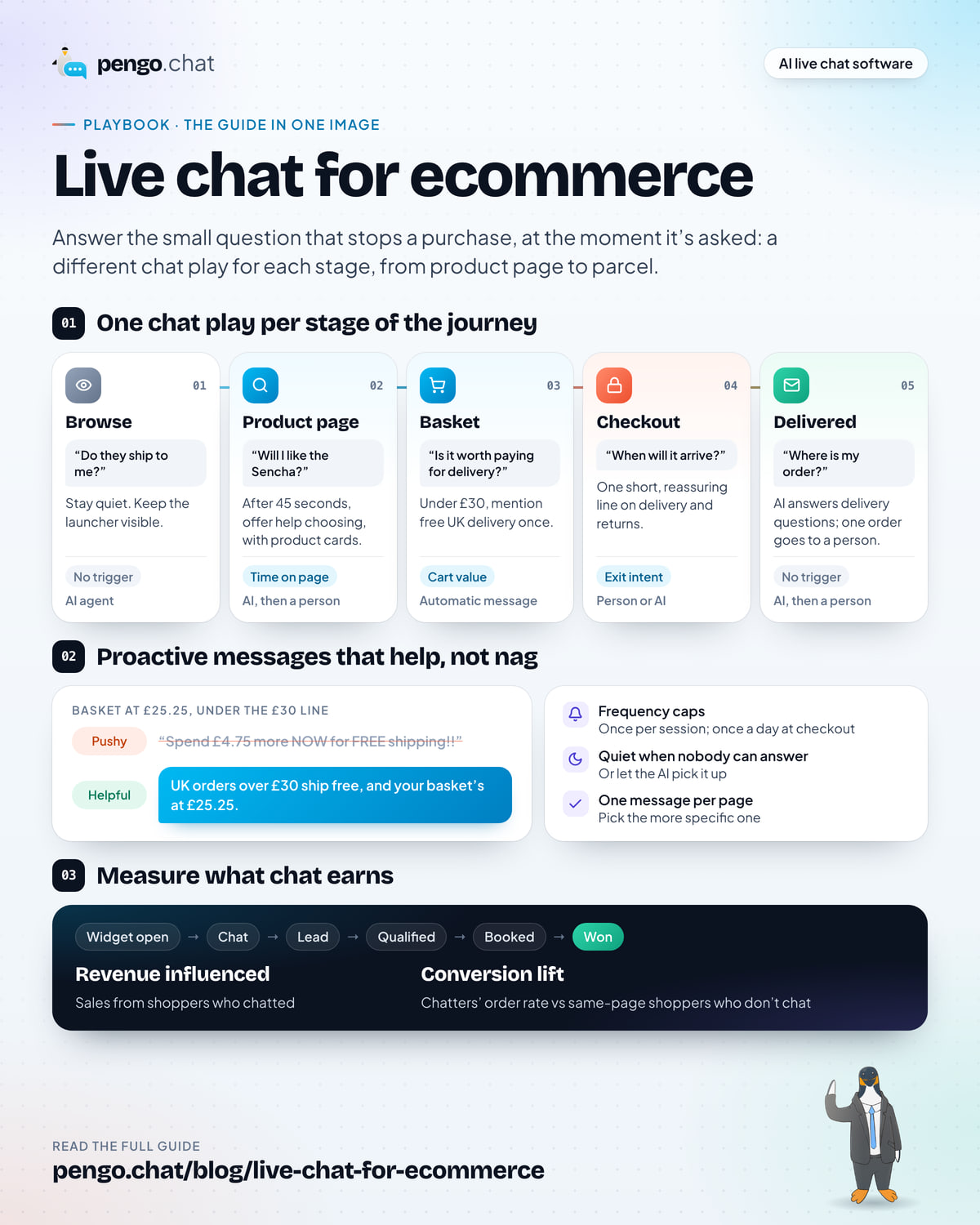
The mistake most stores make is running one chat set-up across the whole site: the same greeting, the same delay, the same bubble on every page. Shoppers need different things at each stage, so the right move changes too.
Two things stand out. First, not every stage gets a proactive message. Browsing visitors haven’t formed a question yet, and interrupting them is noise. Second, the stages closest to money get the lightest touch. At checkout you want one short, reassuring line, not a conversation.
Answer pre-sale questions where they’re asked
Pre-sale questions are the most valuable chats a store gets, because the person asking is close to buying and has told you exactly what’s in the way. At Kettlewell, they sound like this:
- “is the rain shell properly waterproof or just showerproof?”
- “how much is delivery to Denmark”
- “does the daypack fit a 2 litre water bladder”
- “can I give the sock club as a gift”
- “do the trailhead boots come up small”
Notice how specific they are. Generic “how can I help?” chats are rare on product pages; people ask about this product.
That shapes how you answer:
- Answer the question first, then help them decide. “They run about half a size small, so most people go up a size. If you’re between sizes, size swaps are free, so pick the larger pair.”
- Use product cards and buttons. A product card in the chat (image, name, price, a button to view or add it) saves the shopper finding it again. Two or three options as buttons beat a paragraph comparing them.
- Make your product pages answer the common questions. If three people a week ask whether the Trailhead runs small, the product page should say so. Chat is also your research tool for better pages.
Let the AI take shipping, returns and product questions
Most pre-sale questions have answers somewhere on your site: delivery times, returns, what’s in the box, how it fits. An AI agent trained on those pages can answer them instantly, at any hour, and cite where the answer came from.
For Kettlewell, the core content is short: the delivery page (UK 1–2 working days, EU 3–5, US 5–8, free UK delivery over £50), the returns page (unworn items within 60 days, free size swaps, with a prepaid Royal Mail label), product pages and the size guides. That handful of pages answers the questions Kettlewell hears most.
What the AI shouldn’t do in a store:
- Promise discounts, free gifts or exceptions. Put these in its “never” list.
- Change orders, addresses or subscriptions. Hand these to a person.
- Guess. If a product page doesn’t say whether the kit is dishwasher safe, the right answer is “I’m not sure, let me get someone who knows”, not a confident guess.
Our guide to setting up an AI agent for customer support covers training, confidence thresholds and handoff in full.
Proactive messages that help instead of nag
A proactive message is a chat bubble that opens on its own when a shopper does something: spends a while on a page, adds to their basket, moves to leave. Done well, it answers a question before the shopper has to ask it. Done badly, it’s a pop-up with a chat icon.
Which pages and triggers to use
Three placements do most of the work in a store:
- Product pages, after real time on the page. Someone reading a product page for 45 seconds or more is weighing it up. That’s the moment to offer help choosing. Under ten seconds, they’re still looking around.
- The basket, by cart value. If you have a free-delivery threshold, a basket just under it is the clearest moment to mention it. Kettlewell’s is £50.
- Checkout, on exit intent. When the cursor heads for the tab bar on the checkout page, a short line on delivery times and returns can answer the doubt that’s making them leave.
Then add the guard rails:
- Frequency caps. Once per session for product-page and basket messages; once per day for checkout. A message that reappears on every page view is the fastest way to get the widget closed for good.
- Stay quiet when nobody can answer. If a message invites a conversation and nobody is online to have it, either let the AI pick it up or switch the message off out of hours.
- One message per page. If a shopper qualifies for two, pick the more specific one.
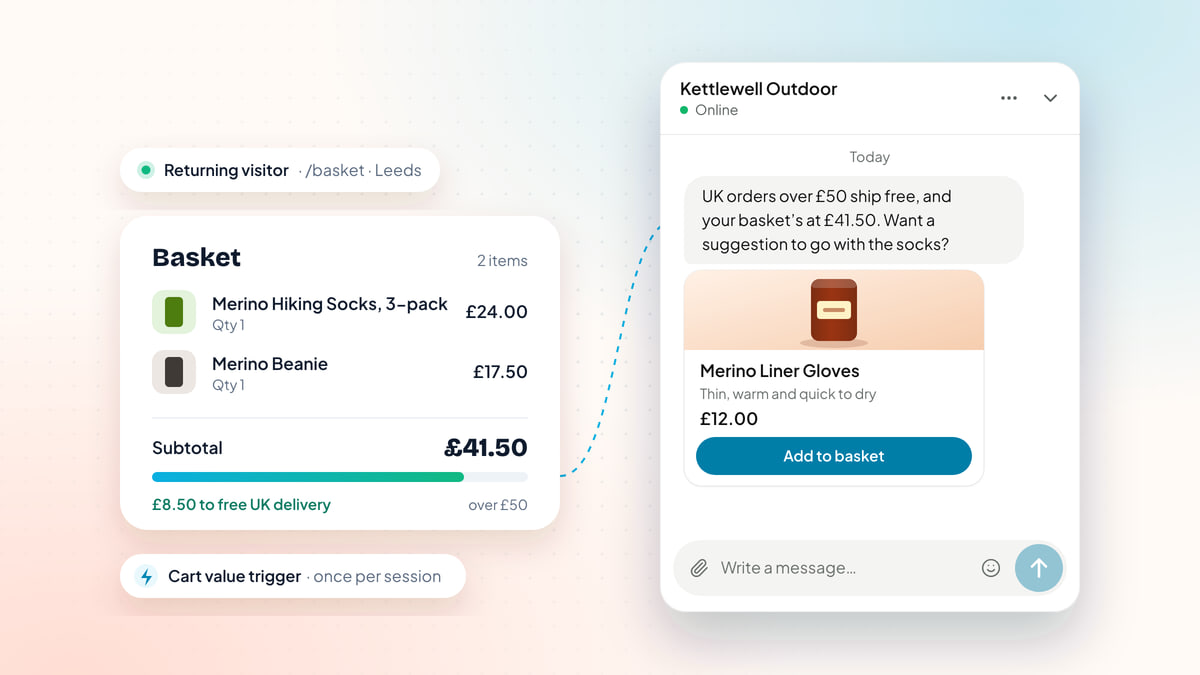
Here’s what a cart-value message looks like when it’s done well:
A Kettlewell Outdoor chat widget. The shop writes: UK orders over £50 ship free, and your basket's at £41.50. Want a suggestion to go with the socks? A product card follows for Merino Liner Gloves, £12.00, with an Add to basket button. The shopper replies: oh go on then, added. The shop confirms the basket is now £53.50, so UK delivery is free. Beside it, the basket shows Merino Hiking Socks, 3-pack £24.00 and Merino Beanie £17.50, and the trigger rule: cart value from £35.00 to £49.99, URL contains /basket, once per session.
Notice the wording: “UK orders over £50 ship free”. Kettlewell ships to the EU and US too, and the cart-value trigger doesn’t know where the shopper lives. Copy that’s true for everyone who might see it avoids promising a German customer free delivery they won’t get.
Good proactive copy vs pushy copy
The difference is almost always the same: helpful copy answers a question the shopper is probably asking; pushy copy tries to hurry them.
| Where | Pushy | Helpful |
|---|---|---|
| Product page, 45 seconds in | “Wait! Don’t leave without 10% off your first order!” | “Not sure which size to go for? Happy to help you pick.” |
| Basket under £50 | “Spend £8.50 more NOW for FREE shipping!!” | “UK orders over £50 ship free, and your basket’s at £41.50.” |
| Checkout, exit intent | “Are you sure? Your basket will expire!” | “Any questions before you go? UK delivery takes 1–2 working days, and unworn items can come back within 60 days.” |
| Subscription page, returning visitor | “Subscribe today and never run out!” | “Questions about the Sock Club? Happy to explain how changing your subscription works.” |
| Any page, 5 seconds in | “Hi there! Need help?” | (Nothing. They’ve only just arrived.) |
A useful test: would a good shop assistant say this out loud, at this moment, to this person? If it would sound odd in a shop, it reads as odd in chat.
Use live visitors and intent signals
The most useful thing a live-visitors view gives a small store is focus. Instead of waiting for chats, you can see who’s on the site right now, what they’re looking at and how engaged they are, and choose who’s worth a personal message.
The signals that matter most:
- On a buying page: the basket, checkout or a subscription sign-up page.
- Returning visitor: they’ve been before, so they’re further along than a first-timer.
- Five or more pages in this visit: comparing, not just passing through.
- Engaged for three minutes or more.
Two or more of these together usually means a serious shopper. Say Daniel Hirsch, in Hamburg, is back for the second time this week, has viewed seven pages and has been on the checkout page for four minutes. A short, specific message fits: “EU orders take 3–5 working days from Leeds. Any questions before you check out?” A generic greeting to everyone on the homepage doesn’t.
Some shoppers show they’re stuck: a discount code that fails three times, or someone bouncing between the delivery page and checkout. Those are exactly the moments a person (or a well-trained AI) can save a sale with one sentence. Pengo Intelligence watches for these patterns and drafts a proactive message, with a cooldown so the same visitor isn’t messaged twice in quick succession.
Cut “where is my order” chats after the sale
After an order, chat shifts from selling to support. The goal changes too: answer quickly, fix what’s wrong, and stop the same question arriving again.
Most WISMO chats are preventable. The shopper is asking because they don’t know what’s normal. So start upstream:
- State delivery times everywhere the shopper looks: product page, basket, checkout, confirmation email. “UK orders arrive in 1–2 working days” on the confirmation email heads off a lot of day-two chats.
- Send tracking as soon as it exists, and say in the email what to do if it stalls.
- Write one clear shipping article that covers times by region, what “working days” means, and what to do if a parcel is late. This is also what your AI agent will answer from.
Then split the chats that still arrive:
- General questions (“how long does EU delivery take?”) go to the AI, which answers from the shipping article and cites it.
- Questions about one specific order (“KW-21187 hasn’t moved since Tuesday”) need someone who can see the order. Have the AI collect the order number and hand over, so your teammate starts with the facts.
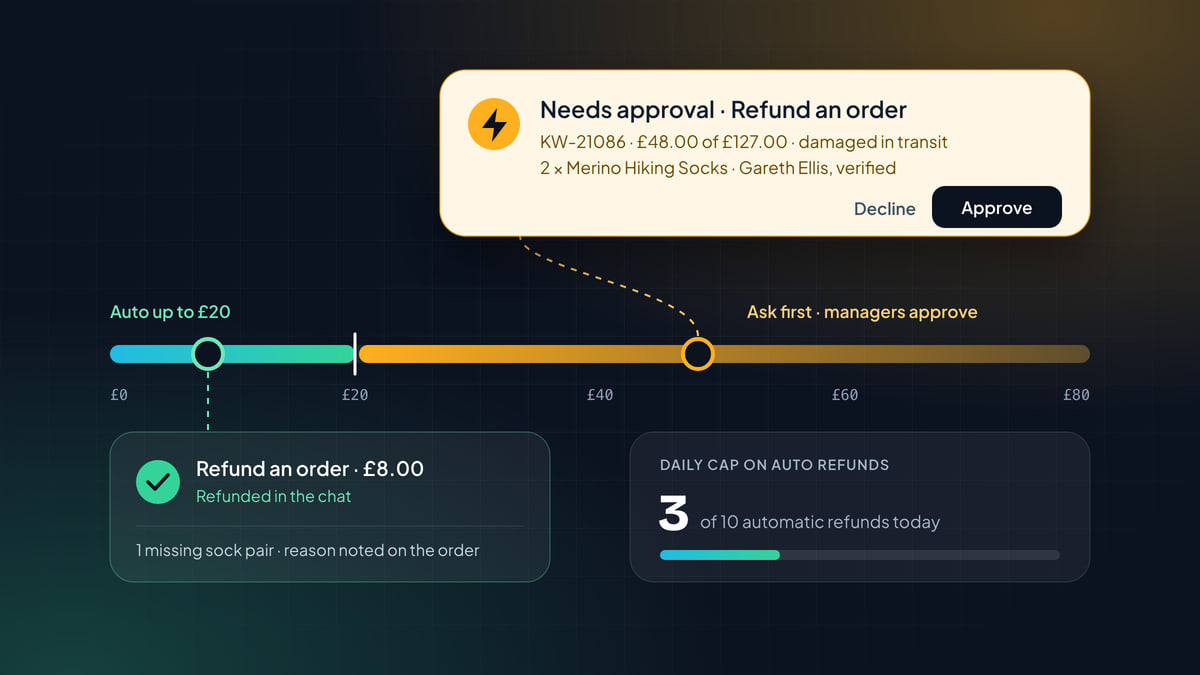
If you have a developer, Pengo Actions can also call your own backend through signed connectors, so the agent can look up an order’s status itself. Each action can run automatically, wait for a teammate’s approval, or stay off.
Returns work the same way. Kettlewell’s rule is simple (unworn items within 60 days, free size swaps, prepaid Royal Mail label), so the AI can explain it. Deciding on an exception for boots that leaked after a week on the fells is a person’s job.
Collect an email before handing off
The worst ending to a store chat is a shopper who asked a good question, waited, and closed the tab before anyone replied. You can’t follow up, and the sale is gone.
Avoid it by asking for an email address at the right moment:
- Not before a simple question. Making someone fill in a form to ask about delivery times costs you more chats than it saves.
- At the handoff. When the AI passes a chat to a person, or the question will take a while, ask: “In case you have to go, what’s the best email to reply to?”
- Always out of hours, through an offline form, with a clear note on when you’ll reply.
Make sure replies land in the same conversation, so the shopper sees the answer in their inbox and can reply from there. And if you’re in the UK or EU, collect consent properly: the form should say what you’ll use the address for.
Cover the hours you’re closed
Online stores don’t close, but small teams do. Many shoppers browse in the evening and at weekends, often when nobody’s in the inbox.
A sensible out-of-hours set-up:
- Business hours in the widget, so shoppers see when a person will be back.
- The AI agent on, answering delivery, returns and product questions from your content, and handing off what it can’t answer.
- An offline form for everything else, collecting an email and the question.
- Proactive messages that invite a conversation switched off, or rewritten so the AI can genuinely handle the reply.
Then check the overnight chats first thing. If the same question keeps arriving at night, it’s a content gap: add the answer to your help content and the AI will take it next time. Our live chat best practices playbook shows how to plan a schedule around your busiest hours.
How to measure the revenue chat influences
Most stores want to know one thing: does chat make money? Your chat analytics and store reports can answer it in two numbers.
Start with the funnel. Pengo’s analytics follow each visitor from widget open → chat → lead → qualified → booked → won. For a store, the middle steps are lighter (a lead is a shopper who left an email; “won” is an order), but the shape is the same: how many people opened chat, how many talked to you, and how many bought.
From that you get revenue influenced: sales from shoppers who chatted. Then add the number that shows chat’s own effect: the conversion lift, the difference between how often chatters order and how often shoppers on the same pages order without chatting.
Put in your own numbers:
These starting values are placeholders, not benchmarks. Replace them with numbers from your own store and chat reports.
Orders from shoppers who chatted
240 chats × 22% =
52.8
Revenue influenced by chat
52.8 orders × £31.60 =
£1,668
Extra revenue from chat’s conversion lift
240 × (22% − 4.0%) × £31.60 =
£1,365 a month
About £5.69 for every pre-sale chat.
A calculator with four inputs: pre-sale chats a month, the order rate of shoppers who chatted, the order rate of shoppers who did not, and average order value. With placeholder inputs of 240 chats, 22 percent, 4 percent and £31.60, it shows 52.8 orders, £1,668 revenue influenced and about £1,365 a month of extra revenue from the conversion lift.
Where to get each input:
- Pre-sale chats: count chats that started on product, basket or checkout pages. Leave out post-purchase questions.
- Chatters who order: your analytics funnel, or match chat email addresses against orders for the following week.
- Average order value: your store’s report for the same period.
- Order rate without chat: the share of shoppers who viewed the same product, basket and checkout pages but didn’t chat and still ordered. Your store analytics will give you this per page.
Track both numbers month by month. As your proactive messages, AI answers and saved replies improve, the lift is the number to watch grow.
Mistakes that cost stores sales
- A discount code in every popup. It trains shoppers to wait for one, cuts margin on orders you’d have got anyway, and makes your chat feel like an ad.
- The chat covering “Add to basket” on mobile. On a phone, a launcher in the bottom corner can sit right on top of the buy button or the checkout total. Check your product and basket pages on a real phone, and hide or move the launcher where it gets in the way (Pengo’s JavaScript API can hide and show it per page).
- Proactive messages on every page. If everything triggers a message, nothing feels personal, and shoppers learn to close the bubble without reading.
- A form before every question. Asking for name, email and order number before “how long is delivery?” loses the shopper.
- A bot with no way out. If a shopper can’t reach a person when they need one, the AI becomes the reason they leave.
- Copy that isn’t true for everyone. Free-delivery messages shown to international shoppers, or “we’re online” when nobody is.
- A heavy widget on product pages. Product pages are where speed matters most. Check what your widget loads; our guide to whether your chat widget slows down your site shows how.
Your ecommerce chat set-up checklist
Ecommerce live chat set-up
0 of 10 done
Chat in a store works best when it behaves like a good shop assistant: around when you need it, quiet when you don’t, honest about delivery and returns, and never pushy about the till. Set up each stage of the journey that way and the sales follow from the questions you answer.