Subscription cancellation flow in chat: save the customers you can, never trap the rest
Handle cancellation requests in chat: ask why, make one offer that fits (skip, pause, a cheaper plan), then cancel at period end without a fight.

On this page
- Why chat beats a cancel form
- Step 1: Listen for the reason first
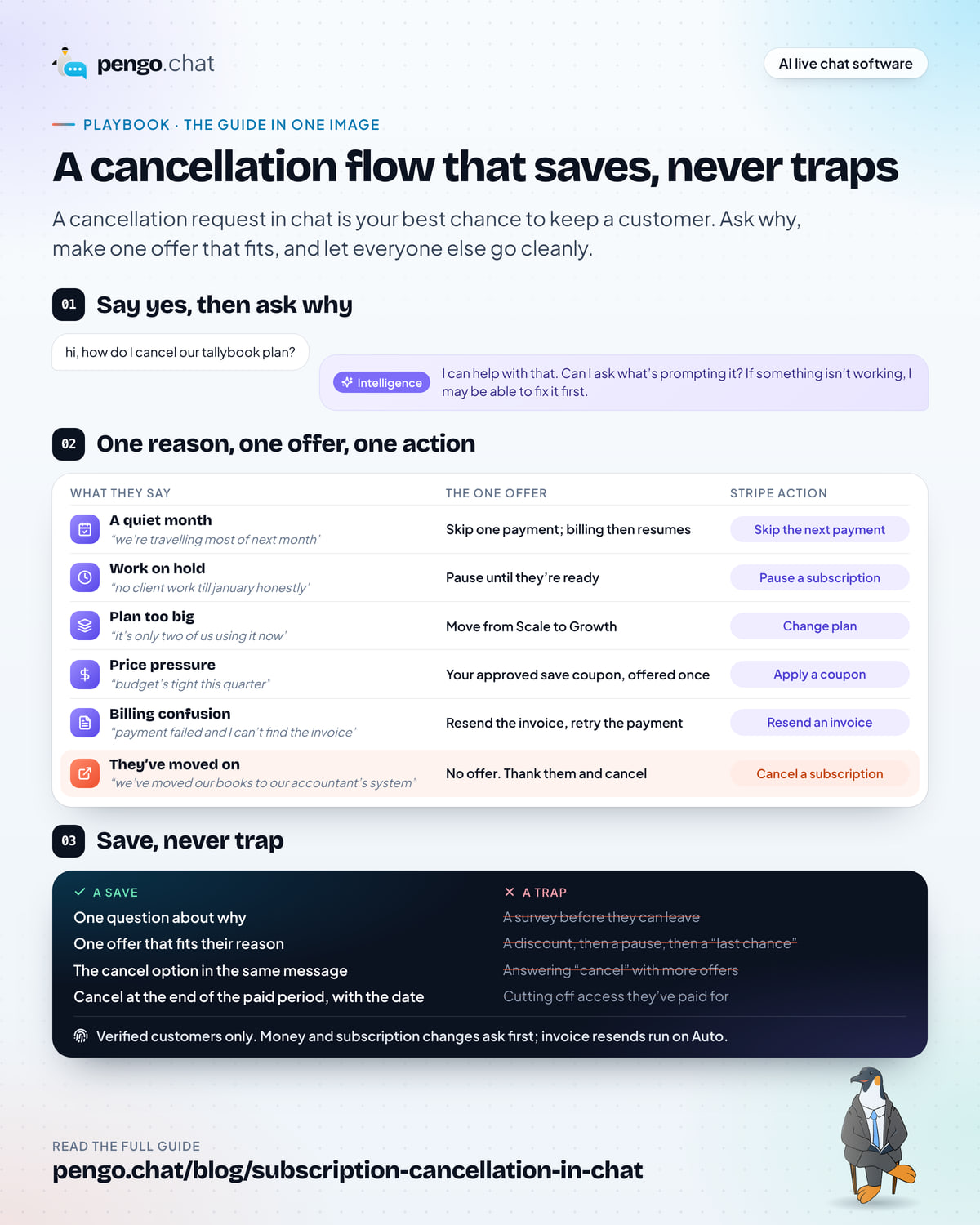
- Step 2: Match the offer to the reason
- Step 3: Make one offer, then let them go
- Step 4: Cancel at the end of the paid period
- Step 5: Make sure it’s really the account holder
- Step 6: Decide what needs a person’s yes
- What the customer is told, at every step
- Record the reason, then actually read it
- Mistakes we see most often
- Your cancellation flow checklist
Key takeaways
- A cancellation request in chat is your best chance to keep a customer, because you hear the reason and can often fix it in the same conversation.
- Ask why first, then make one offer that fits the reason: skip a payment for a quiet month, pause for work on hold, a cheaper plan for paying too much, an invoice or a retry for billing mix-ups.
- If they still want to go, cancel straight away and without a second pitch. Cancelling should be as easy as signing up, and in many places consumer rules expect exactly that.
- Cancel at the end of the paid period so customers keep what they paid for, and only for verified customers, so nobody can cancel someone else's account.
- Tag every cancellation with its reason and read them monthly. The reasons are a product roadmap your customers wrote for you.
“hi, how do I cancel our tallybook plan?”
That message lands in a lot of inboxes every day, and most teams treat it as the end of the story. They send a link to the billing page, or worse, a form with six required fields, and the customer leaves without anyone learning why.
It doesn’t have to go that way. A cancellation request in chat is the one moment a customer tells you, unprompted, that something isn’t working. Often the something is small: a quiet month, a project on pause, a plan that’s bigger than they need now. Fix that, in the same conversation, and they stay. Miss it, and they’re gone.
But the same moment is where you must never trap anyone. Customers who want to leave and can’t, remember it for a long time, and so do the people they tell. This playbook covers both halves: how to save the customers who’d rather stay, and how to let everyone else go cleanly. We’ll use Tallybook, an invoicing and bookkeeping tool for small agencies that bills its customers on Stripe, with a Growth plan and a bigger Scale plan.
Why chat beats a cancel form
Cancel forms and cancel buttons have one job: process the cancellation. Some ask for a reason in a dropdown, but nobody reads the dropdown in time to do anything about it. By the time someone looks at the report, the customer has been gone for weeks.
Chat changes three things:
- You learn the real reason, in their words. “Too expensive” in a dropdown could mean anything. “it’s only two of us using it now” tells you exactly what to offer.
- You can fix it while they’re still there. A pause, a skipped payment or a smaller plan can happen in the same conversation, before the customer has moved on in their head.
- It feels like service, not a gate. A good chat is a person (or an assistant) helping, which is very different from a retention script someone has to get through.
The catch is that chat only helps if someone can act on what they hear. An assistant that can answer “how do I cancel?” but can’t pause the plan just hands the customer a link, and you’re back to the cancel form. That’s why the rest of this playbook pairs each step with the action behind it.
Step 1: Listen for the reason first
Before you offer anything, ask. One plain question, in a warm tone, is enough:
I can help with that. Can I ask what’s prompting it? If something isn’t working, I may be able to fix it first.
Three things make this work:
- Say yes to the cancellation before you ask. “I can help with that” tells the customer they’re not about to be argued with. People answer honestly when they don’t feel cornered.
- Ask one question, not a survey. A single open question gets you a real answer. Five questions get you “other”.
- Accept “just cancel it” as an answer. If they don’t want to explain, don’t make them. Cancel it and thank them.
The tone matters as much as the words. Short, warm and plain beats scripted every time; our live chat best practices go deeper on writing replies that sound like a person.
Most answers fall into a handful of buckets. Here’s what they tend to sound like in a Tallybook chat:
| What they say | What it usually means |
|---|---|
| “we’re travelling most of next month” | A quiet month, not a lost customer |
| “no client work till january honestly” | The work is on hold for a while |
| “it’s only two of us using it now” | They’re on a plan bigger than they need |
| “budget’s tight this quarter” | Price pressure, often temporary |
| “payment failed and I can’t find the invoice” | Billing confusion that feels like a reason to leave |
| “we’ve moved our books to our accountant’s system” | They’ve genuinely moved on |
Notice how few of these are really about the product. Most are about timing, size or money, and every one of those has a fix that isn’t cancelling.
Step 2: Match the offer to the reason
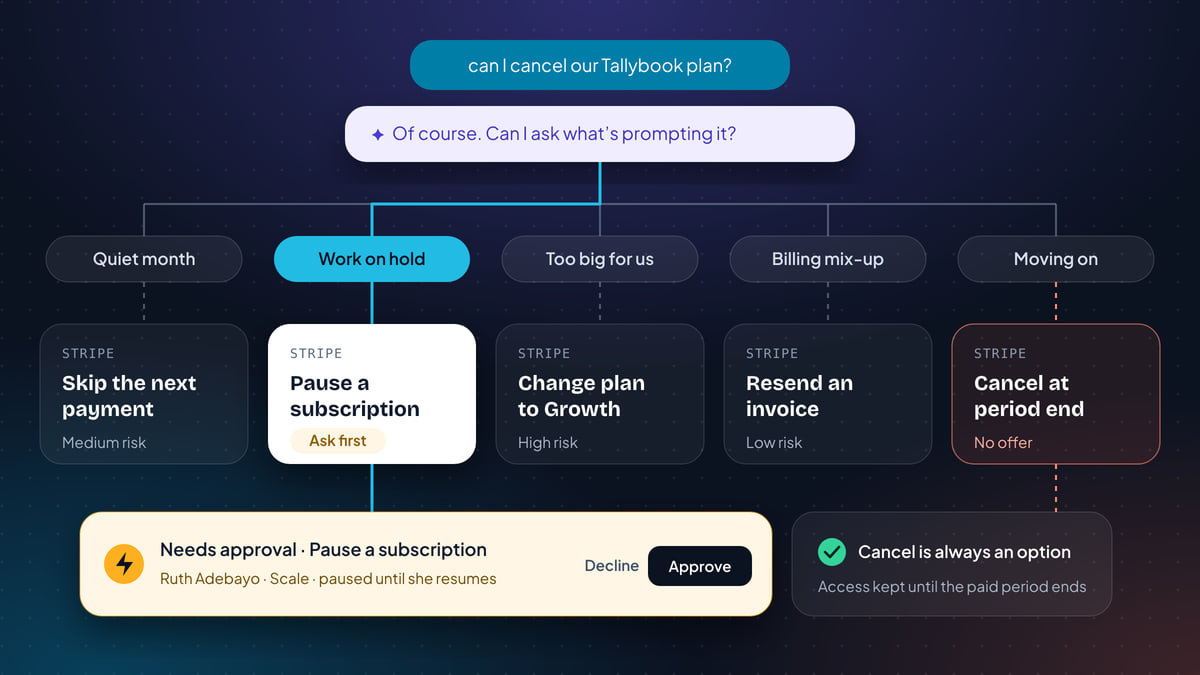
This is the heart of it. Each reason has one natural offer, and each offer is a specific change in your billing tool. Pick a reason below to see the offer and the Stripe action behind it.
The one offer
Skip the next payment. Billing picks up again on its own after that, and nothing else changes.
The Stripe action behind it
Skip the next payment
Medium risk Starts on Ask first Verified customers only
One billing cycle, then it resumes by itself
Still want to cancel? Cancel a subscription, at the end of the paid period. No second offer.
The one offer
Pause the plan until they’re ready. Nothing is charged while it’s paused, and they resume whenever they like.
The Stripe action behind it
Pause a subscription
Medium risk Starts on Ask first Verified customers only
Paused until the customer asks to resume
Still want to cancel? Cancel a subscription, at the end of the paid period. No second offer.
The one offer
Move from Scale to Growth instead of cancelling, so they keep their invoices and history at a price that fits.
The Stripe action behind it
Change plan
High risk Starts on Ask first Verified customers only
Only to plans you’ve approved, with your proration
Still want to cancel? Cancel a subscription, at the end of the paid period. No second offer.
The one offer
Offer your save coupon on the plan they already have, once, and say plainly how long it lasts.
The Stripe action behind it
Apply a coupon
High risk Starts on Ask first Verified customers only
Only from your approved list; Pengo can never make one up
Still want to cancel? Cancel a subscription, at the end of the paid period. No second offer.
The one offer
Fix the real problem. Resend the open invoice, and retry the payment once they’ve updated their card.
The Stripe action behind it
Resend an invoice
Low risk Starts on Auto Verified customers only
Then Retry a failed payment after the card is updated
Still want to cancel? Cancel a subscription, at the end of the paid period. No second offer.
The right move
No offer. Thank them, cancel at the end of the paid period and tell them the date their access ends.
The Stripe action behind it
Cancel a subscription
High risk Starts on Ask first Verified customers only
At the end of the paid period; access stays until then
An interactive picker of six cancellation reasons. The default, paying for more than we use, shows the customer saying only two of them use it now, the offer to move from Scale to Growth, and the Change plan action in Stripe: high risk, starts on Ask first, verified customers only, only to plans you've approved. Below it, the exit: cancel at the end of the paid period, with no second offer.
In words, the ladder looks like this:
- A quiet month → skip the next payment. One billing cycle is skipped and billing picks up again on its own afterwards. Nothing to remember, nothing to restart.
- Work on hold → pause. Billing stops until the customer asks to resume. Better than a skip when they don’t know how long it’ll be.
- Paying for more than they use → change to a cheaper plan. For Tallybook, Scale to Growth. They keep their data and their habit, at a size that fits.
- Too expensive right now → an approved coupon. Your save-the-sale discount on the plan they already have, offered once, with a clear end date.
- Billing confusion → fix the billing. Resend the open invoice, and retry the failed payment once they’ve updated their card. Often, “I want to cancel” here means “I’m annoyed this is broken”.
- They’ve moved on → no offer. Thank them and cancel. Pitching to someone who’s already switched wastes their time and yours.
Two rules keep the ladder honest. First, only offer what you’ve decided in advance. Write down which coupon you’ll use for saves and which plans a customer can move to, and don’t improvise in the moment. Second, match the offer to the reason they gave, not the one you wish they’d given. If someone says the project is on hold, a discount doesn’t fix that. A pause does.
If you run a consumer subscription, the same ladder works with different words. Someone in Kettlewell Outdoor’s Sock Club who says “I’ve got more socks than I can wear” wants to skip a month, not leave. Someone who says “money’s tight” might take a pause. Someone who’s moving abroad just wants to cancel.
Step 3: Make one offer, then let them go
Here is the line between saving and trapping: one offer. Make it clearly, put the way out in the same message, and accept the answer.
That makes sense. I can pause your Scale plan so nothing is charged until you’re ready, or cancel it at the end of your paid period. Which would you prefer?
Both options sit side by side, and both are easy. The customer doesn’t have to say no to the pause before they’re allowed to see the cancel option.
If they say “just cancel”, cancel it. Don’t follow up with a bigger discount, a “before you go” survey or a list of features they’ll lose. Every extra step after a clear no turns a save attempt into an obstacle, and customers can feel the difference instantly.
There’s a practical reason for this beyond goodwill. In many places, consumer rules expect cancelling a subscription to be as easy as signing it up, and flows that bury the exit, demand a phone call or keep pitching can fall foul of them. The rules differ by country and they change, so check what applies to your customers. The safe principle travels everywhere: offering a conversation is fine; requiring one to leave is not. Keep your self-serve cancel option where customers expect it, and make the chat a faster, friendlier route, not the only door.
Step 4: Cancel at the end of the paid period
When a customer does cancel, cancel at the end of the period they’ve already paid for. They keep access until then, which matters more than it sounds:
- They get what they paid for. Cutting off a paid month early feels like a penalty for leaving.
- They have time to tidy up. For Tallybook, that means sending the last invoices and exporting their books.
- They can change their mind. Some customers cancel, realise during the last fortnight that they still need it, and come back. Ending early removes that chance.
Then say exactly what happens and when: “Your Scale plan is cancelled. You’ll keep full access until 14 November, and you won’t be charged again.” A date beats “at the end of your billing cycle”, because nobody remembers when their billing cycle ends.
Step 5: Make sure it’s really the account holder
A cancellation is a change to someone’s account, so it has to be the right someone. Typing an email address into a chat box proves nothing; anyone can type anyone’s email.
The fix is to know who’s signed in. If your customers chat from inside your app (Tallybook’s billing page, for example), identity verification lets your server sign each user’s ID so the chat knows for sure who it’s talking to. Without it, the safest thing an assistant can do is ask the customer to sign in, or hand the conversation to a person who can check.
Step 6: Decide what needs a person’s yes
Not every save needs the same level of care. A skipped payment is easy to undo. A cancellation, a coupon or a plan change touches revenue. It’s worth deciding, action by action, what your assistant can do on its own and what waits for a teammate.
In Pengo, every action has a mode, set per action and per website in Intelligence › Actions:
| Mode | What happens | Good for |
|---|---|---|
| Auto | Pengo runs it as soon as the customer asks and it has what it needs | Lookups, sharing or resending an invoice, and changes you’ve grown to trust |
| Ask first | Pengo prepares it, tells the customer it’s with the team, and waits for a teammate to approve | Cancellations, coupons and plan changes, at least to start |
| Team only | Pengo says a teammate is joining, hands over and leaves the action ready, pre-filled, in the inbox Actions button | Saves you want a person to own end to end |
| Off | Pengo never runs it, and hands the customer to your team instead | Anything you’d rather handle outside chat |
Everything that changes a subscription or moves money in Stripe starts on Ask first, so nothing happens to a customer’s billing until a teammate says yes. Here’s how that looks when Ruth from a Leeds design studio wants to cancel.
The approval card shows Needs approval and “Pause a subscription” with the details, and the teammate clicks Approve, edits the details first, Declines it (optionally with a message for the customer), or clicks Take over. The request also appears in the Approvals tab, and approvers can decide from a phone notification, the Apple Watch, email or Slack, so a save doesn’t sit waiting for someone to get back to their desk. See Approve from anywhere.
Risk shapes who can approve. By default any teammate can approve low- and medium-risk actions, like a skip or a pause, while managers and the owner approve high-risk ones, like a cancellation, a coupon or a plan change.
When a teammate handles it
Plenty of cancellations land with a person rather than the assistant, especially from long-standing customers. The same ladder applies, and it shouldn’t take a trip to the Stripe dashboard. In Pengo, the Actions button in the inbox composer shows the actions that fit the conversation, ranked for it, with the customer and subscription already filled in. Pick Pause a subscription, check the details, click Run, and Pengo drafts the reply telling the customer what you did. If the customer isn’t verified, Pengo warns you before the change and asks you to confirm you’ve checked who they are, and that confirmation is recorded. A change above your own limit needs a second teammate to approve it. More in Run actions from the inbox.
When to move a save to Auto
Once you’ve watched a few weeks of saves go through, some will feel routine. Skipping a payment and pausing are good candidates for Auto: they’re medium risk, easy to reverse, and the customer gets an answer in seconds. Keep cancellations, coupons and plan changes on Ask first until you’re confident, and use guardrails where an action involves money, so Pengo runs it on its own up to an amount and asks above it. A daily cap stops anything running away on a busy day. See Guardrails and limits.
If you’re curious about every check a request passes before it touches Stripe, we’ve written up how Pengo Actions stay safe, layer by layer.
What the customer is told, at every step
The fastest way to lose trust in a cancellation flow is to tell a customer something has happened when it hasn’t. So the wording at each stage matters:
- While it waits: “I’ve asked the team to pause your Scale plan, and I’ll confirm here as soon as it’s done.” Not “Done!”, not “Paused!”.
- When it’s approved and done: a confirmation of what actually changed. For a cancellation, include the date access ends.
- If it’s rejected: that a teammate has reviewed it and will follow up with them directly.
- If it couldn’t be completed: that it couldn’t be done automatically and a teammate will follow up. A subscription that’s already cancelled can’t be paused, for example, and the customer deserves to hear that from a person.
Record the reason, then actually read it
Every cancellation conversation, saved or not, tells you something. The trick is to capture it in a way you’ll look at again.
Tag the conversation with the reason. Use a small, fixed set of tags that match your ladder: cancel: quiet month, cancel: on hold, cancel: too big, cancel: price, cancel: billing, cancel: moved on. Add saved or cancelled for the outcome. Fixed tags turn into a report; free text turns into a pile.
Leave a note where your account team will see it. If you use HubSpot, log a note on the customer’s contact with what they said and what they chose. A paused agency is a warm lead in January, and whoever calls them should know why they paused.
Review the tags monthly. Twenty minutes is enough. Look for three things:
- Which reasons are growing. A jump in “too big” after a pricing change is a signal; so is a run of “billing” after a payment provider hiccup.
- Which offers work. If pauses mostly turn into cancellations three months later, your pause might be too long, or the reason wasn’t really “on hold”.
- What you can fix upstream. Every “payment failed and I can’t find the invoice” is a dunning email that didn’t land. Fix the email and those cancellations stop arriving.
Mistakes we see most often
- Offering a discount to everyone. It’s the easiest offer to make and the worst habit to build. Customers learn that “cancel” means “ask for money off”, and the ones who’d have taken a pause get a discount they didn’t need.
- Hiding the cancel option. If the only way out is through the chat, and the chat keeps pitching, you’ve built a trap, however friendly the wording.
- Cancelling immediately. It feels tidy, but it takes away paid access and the chance to change their mind.
- Saying it’s done before it is. “You’re all set!” followed by another charge next month is how a cancellation becomes a chargeback.
- Treating cancellations as a support problem only. The reasons belong in front of whoever owns pricing and product, every month.
- Acting on an unverified request. A customer’s email typed into a chat isn’t proof. Billing changes need a signed-in customer.
Your cancellation flow checklist
Cancellation flow checklist
0 of 12 done
A good cancellation flow keeps more customers than a clever one, because customers can tell when they’re being helped and when they’re being handled. Ask why, offer the one thing that fits, and if the answer is still no, make leaving easy. The customers you save will stay longer, and the ones you let go cleanly are the ones who come back. To see the actions behind every step, have a look at Pengo Actions.